
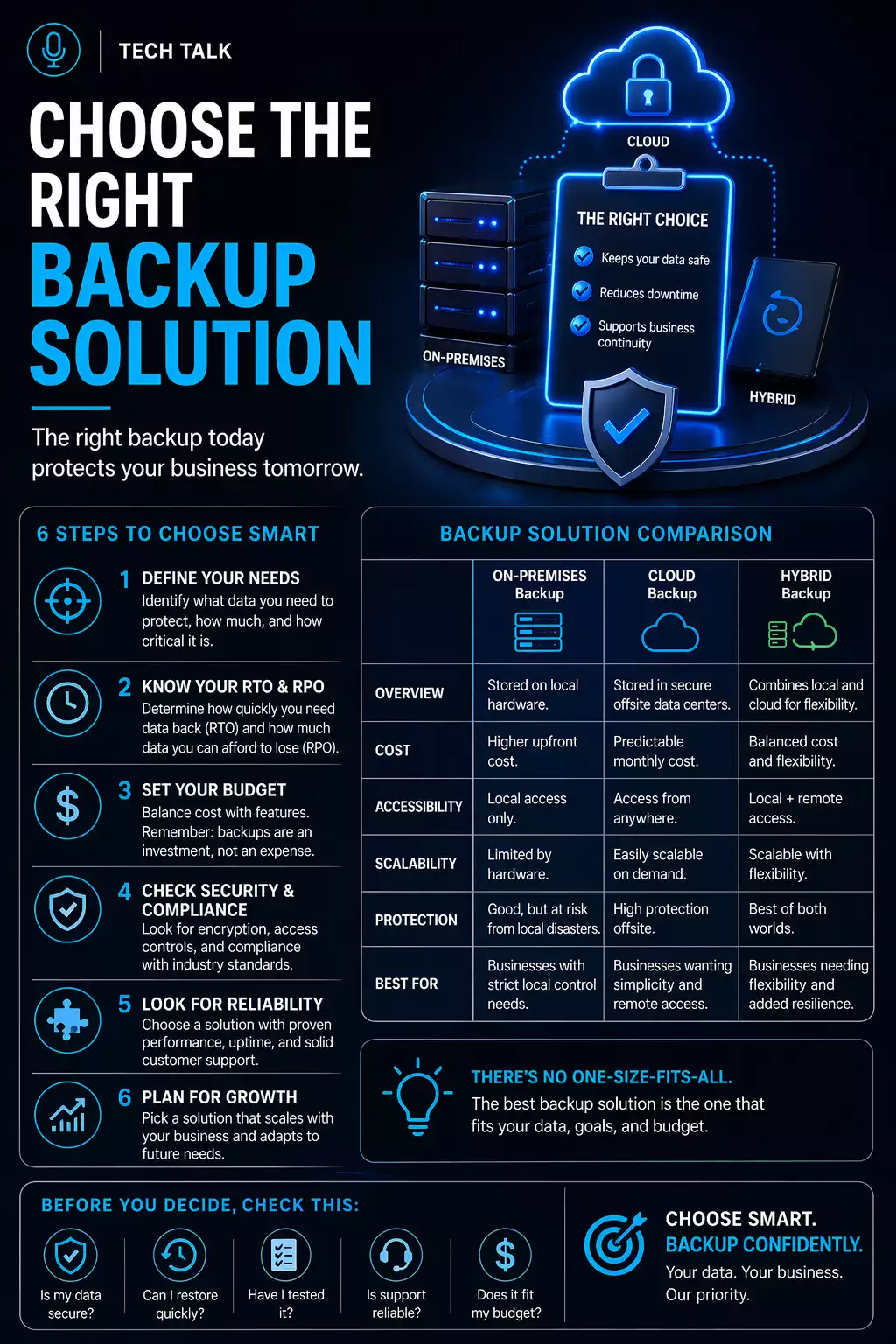
Why Choosing the Right Backup Solution Matters
Many businesses choose backup solutions based on:
- price
- convenience
- brand familiarity
But these factors do not determine whether your business can recover from an incident.
The wrong backup solution often works perfectly — until the moment you actually need it.
Choosing the right solution is not about features.
It is about whether your business can:
- recover fast enough
- avoid unacceptable data loss
- continue operating under pressure
What a Real Backup Decision Looks Like
In real-world scenarios:
- a business selects a low-cost backup solution
- backups run successfully for months
- a failure occurs (ransomware, system crash, deletion)
- recovery is attempted
- restoration is slow or incomplete
- downtime exceeds expectations
At that point:
- the solution technically “worked”
- but the business still suffers major impact
A backup solution is only successful if it meets your recovery needs — not if it simply stores data.
Step 1: Define Your Recovery Requirements
Before choosing a solution, you must define:
- how quickly systems must be restored
- how much data loss is acceptable
These are defined as:
If you do not define recovery requirements first, you will choose the wrong solution.
Step 2: Understand What You Are Protecting
Different systems require different protection.
Examples include:
- file data (documents, shared drives)
- servers and infrastructure
- cloud platforms (Microsoft 365, Google Workspace)
- applications and databases
Each system has:
- different recovery complexity
- different downtime impact
- different backup requirements
There is no single backup solution that fits every system equally well.
Step 3: Evaluate Recovery Speed
Recovery speed is one of the most overlooked factors.
Some solutions:
- store data efficiently
- but restore slowly
This creates a gap between:
- having backups
and - being able to use them quickly
Slow recovery can create the same business impact as no recovery at all.
Step 4: Evaluate Protection Against Modern Threats
Modern threats — especially ransomware — target backups directly.
A backup solution must include:
- isolation from production systems
- access control and permissions
- protection against deletion or modification
If your backup system can be accessed, it can be compromised.
This is why immutable backups are essential.
Step 5: Evaluate Storage and Retention
Backup solutions must retain data long enough to recover from delayed issues.
Retention should account for:
- ransomware dwell time
- accidental changes discovered later
- compliance requirements
Short retention windows can eliminate clean recovery points before problems are detected.
Learn more about backup retention.
Step 6: Understand Infrastructure Limitations
Recovery performance is limited by:
- network speed
- storage performance
- system complexity
For example:
- local backups restore quickly
- cloud backups may take longer
This is why many businesses use both
local and cloud backup.
Step 7: Validate Through Testing
A backup solution is unproven until it is tested.
Without testing:
- data integrity is unknown
- recovery timelines are unknown
- system functionality is unverified
If you have not tested recovery, you do not know if your solution works.
See backup monitoring vs testing.
Step 8: Consider Scalability
Your solution must grow with your business.
This includes:
- increasing data volumes
- additional systems
- new applications
Solutions that work today may fail as complexity increases.
Common Mistakes When Choosing a Backup Solution
Businesses often make the same mistakes:
- choosing based on cost alone
- focusing on storage instead of recovery
- ignoring testing requirements
- failing to secure backups
- relying on a single backup method
These lead to backup failures.
What a Complete Backup Solution Looks Like
A reliable solution includes:
- multiple backup locations
- protected and isolated storage
- sufficient retention
- tested recovery processes
The right solution combines speed, protection, and validation.
Why Most Businesses Choose Incorrectly
Many decisions are driven by:
- short-term cost savings
- lack of technical understanding
- overconfidence in basic solutions
Choosing the wrong solution often feels correct — until recovery is required.
How to Know If Your Current Solution Is Inadequate
You may have a gap if:
- you do not know recovery timelines
- you have never tested a full restore
- your backups are not protected
- your solution cannot meet business needs
If your backup solution cannot meet your recovery requirements, it is not the right solution.
What This Means for Your Business
Backup solutions should be selected based on:
- recovery requirements
- risk tolerance
- system complexity
—not convenience.
The best backup solution is the one that ensures your business can recover under real conditions.
Final Thoughts
Choosing a backup solution is one of the most important decisions for your business.
It determines whether you can:
- recover quickly
- protect critical data
- avoid operational disruption
Need help with this topic?
Make sure your backups actually work when it matters.
Most businesses discover backup failures during an outage. We help you validate recovery, reduce downtime risk, and build a system that works under pressure.
- Backup validation and testing
- Recovery time optimization
- Clear recovery documentation


