
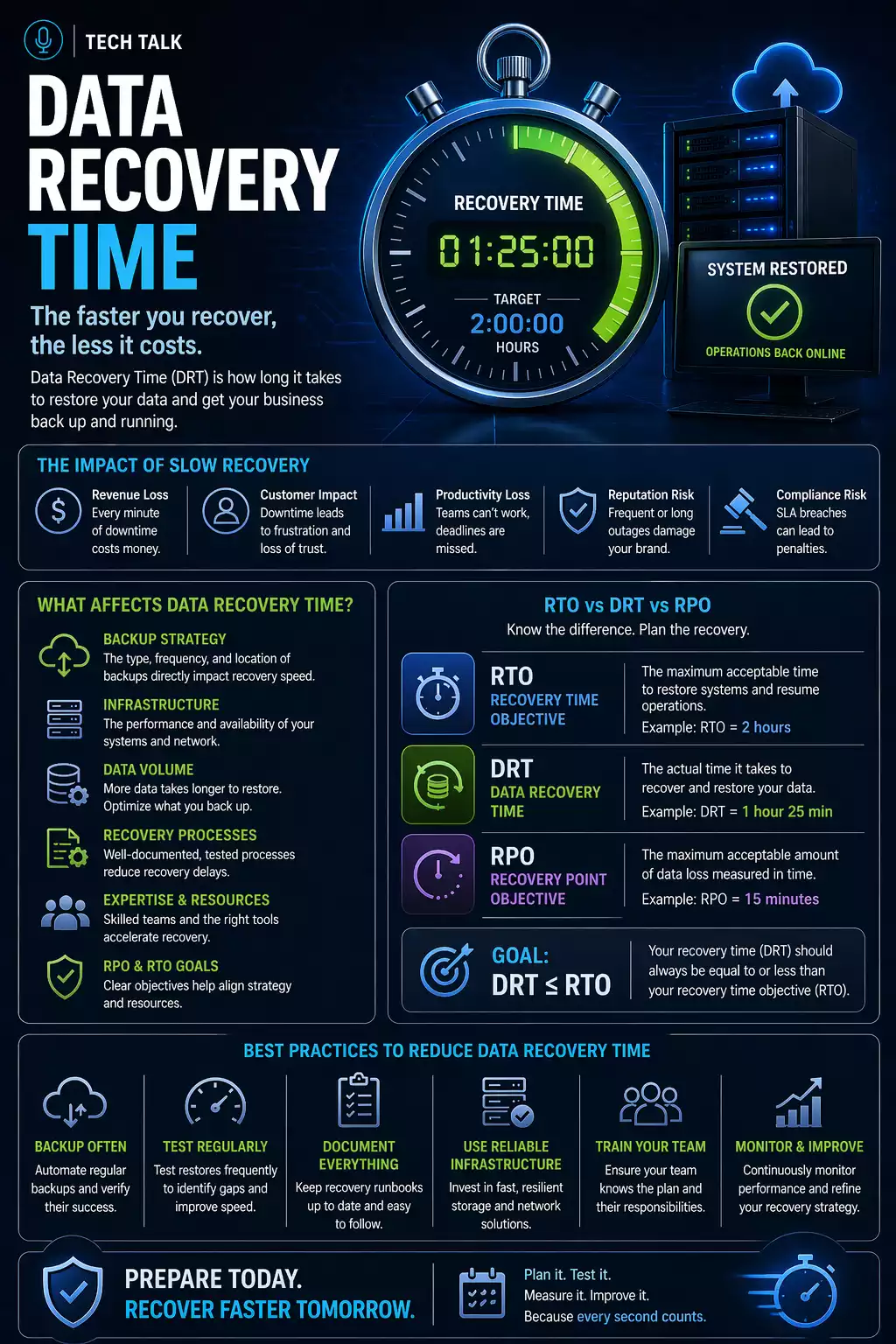
Why Recovery Time Is Often Misunderstood
Most businesses assume:
👉 “We can restore quickly if something goes wrong.”
In reality, recovery is not instant.
Even with backups, restoring systems takes time.
Recovery time is determined by preparation — not by the existence of backups.
What a Real Recovery Looks Like
A typical incident unfolds like this:
- systems fail or are compromised
- teams begin troubleshooting
- the issue is identified
- backups are located
- recovery begins
- systems are restored and tested
During this process:
- employees cannot work
- operations are disrupted
- pressure increases
Recovery is a multi-step process — not a single action.
The Phases of Recovery (Where Time Is Spent)
Recovery time is made up of multiple stages.
1. Detection
- identifying that something is wrong
- recognizing the scope of the issue
👉 Often delayed, especially with ransomware
2. Assessment
- determining which systems are affected
- identifying dependencies
3. Backup Identification
- locating clean recovery points
- verifying data integrity
4. Data Restoration
- transferring and rebuilding data
- restoring systems and applications
5. Validation
- testing systems
- verifying functionality
6. Operational Recovery
- bringing users back online
- restoring workflows
Each stage adds time — even in well-prepared environments.
Typical Recovery Time Ranges
Recovery time varies widely.
Small Incidents (File-Level Issues)
- minutes to hours
- limited scope
System-Level Failures
- several hours to a full day
- multiple systems involved
Full Environment Recovery
- 1–3 days or more
- complex dependencies
Ransomware Recovery
- several days to weeks
- includes containment, rebuild, and validation
Recovery time increases significantly with complexity and scope.
What Actually Slows Down Recovery
Even with good backups, delays occur.
Data Size
- large datasets take longer to restore
Infrastructure Limits
- network speed
- storage performance
System Dependencies
- applications rely on multiple systems
Backup Design
- incremental chains increase restore time
- complex architectures add steps
Human Coordination
- unclear roles
- delayed decisions
Recovery delays are often caused by coordination and dependencies — not just data transfer.
The Role of RTO (Recovery Time Objective)
Recovery time should be defined in advance.
This is known as
RTO.
RTO defines:
- how quickly systems must be restored
- acceptable downtime
If RTO is not defined, recovery expectations are likely unrealistic.
Why Recovery Often Takes Longer Than Expected
Common reasons include:
- underestimating system complexity
- lack of testing
- missing dependencies
- incomplete backup validation
These issues lead to
backup failures.
How to Reduce Recovery Time
Improving recovery speed requires:
- faster backup systems
- local recovery options
- clear recovery procedures
- regular testing
A strong
backup strategy supports all of these.
Why Testing Is Critical
Testing is the only way to measure actual recovery time.
Without testing:
- timelines are estimates
- performance is unknown
How to Know If Your Recovery Time Is Too Long
You may have a gap if:
- you do not know how long recovery takes
- you have never tested full recovery
- downtime expectations are unclear
- systems are highly complex
If you cannot measure recovery time, you cannot manage it.
What This Means for Your Business
Recovery time directly affects:
- productivity
- revenue
- customer experience
The faster you can recover, the lower the impact of an incident.
Final Thoughts
Recovery time is one of the most important factors in any backup strategy.
It determines whether your business can continue operating during disruption.
Need help with this topic?
Make sure your backups actually work when it matters.
Most businesses discover backup failures during an outage. We help you validate recovery, reduce downtime risk, and build a system that works under pressure.
- Backup validation and testing
- Recovery time optimization
- Clear recovery documentation


