
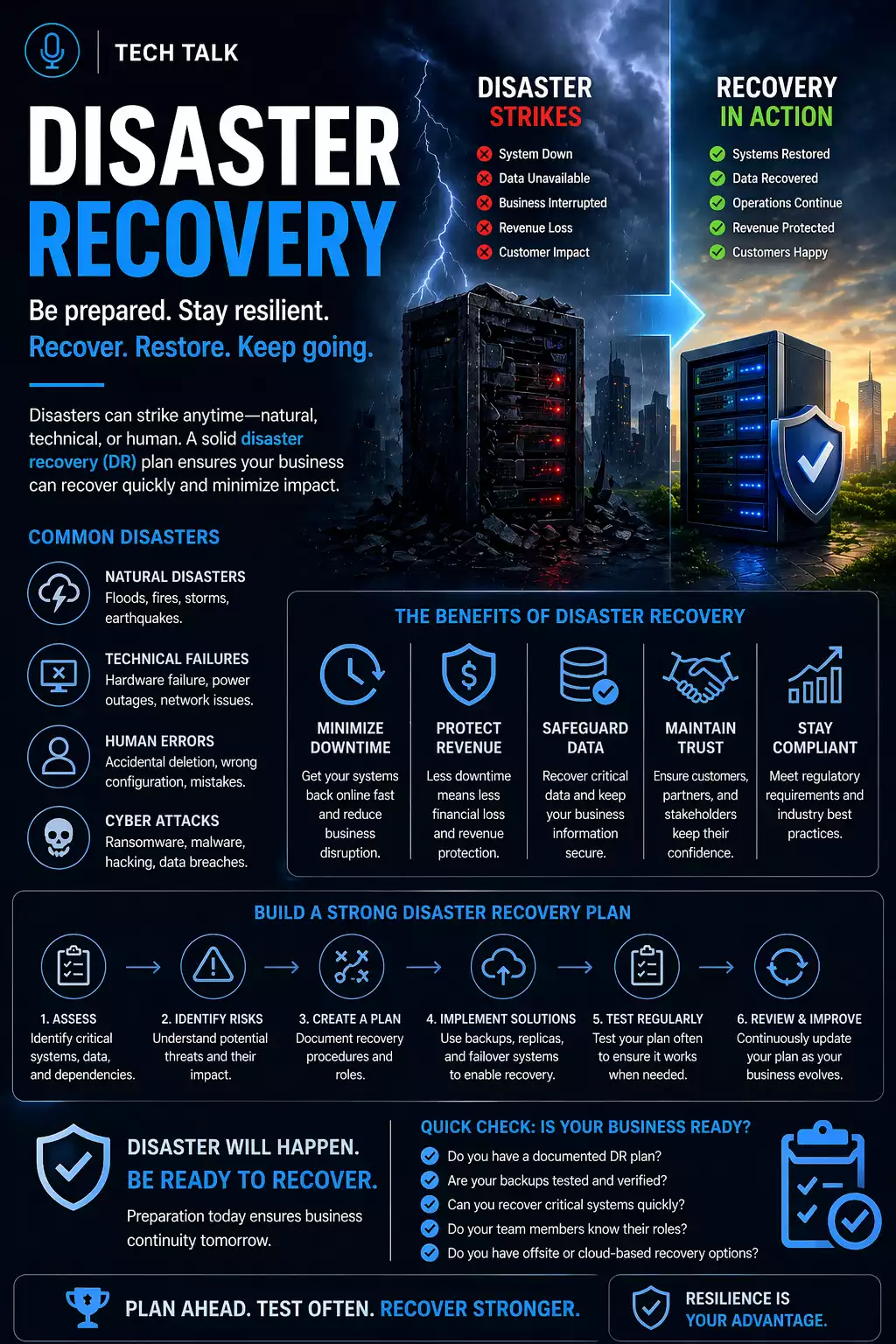
What Disaster Recovery Really Means
Disaster recovery is not an IT task — it is a business survival function.
It is the process of restoring your systems, data, and operations after an unexpected event.
This includes:
- cyberattacks and ransomware
- hardware failure
- human error
- natural disasters
Many businesses assume their backup and recovery strategy covers this.
It does not.
Backups protect data. Disaster recovery protects your ability to operate.
Without a defined recovery plan, downtime is not a possibility — it is an outcome.
What a Real Disaster Looks Like
A typical incident unfolds in stages:
- systems go offline unexpectedly
- the scope of impact is unclear
- teams scramble to assess damage
- backups are located and evaluated
- recovery begins
- unexpected issues appear (missing data, slow systems, dependencies)
During this time:
- operations are disrupted
- employees cannot work
- customer impact increases
Disaster recovery is not a single action — it is a multi-stage process that introduces delays at every step.
The Phases of Disaster Recovery
Understanding the phases explains why recovery takes time.
1. Detection and Assessment
- identifying the incident
- determining affected systems
2. Containment
- stopping further damage
- isolating compromised systems
3. Backup Validation
- confirming usable recovery points
- identifying clean data
4. System Restoration
- restoring servers and infrastructure
- rebuilding environments
5. Application Recovery
- restoring databases and applications
- resolving dependencies
6. Business Restoration
- bringing users back online
- resuming operations
Recovery delays are often caused by transitions between phases — not just technical limitations.
Why Disaster Recovery Fails for Small Businesses
Most failures are not caused by the event itself.
They are caused by lack of preparation.
In real-world scenarios:
- recovery steps are unclear
- systems are not prioritized
- backups are incomplete or inaccessible
- recovery timelines are unknown
When recovery fails, the impact is measured in downtime, lost revenue, and operational disruption.
The Core Components of a Disaster Recovery Plan
A practical disaster recovery plan is built on clarity, structure, and validation.
1. Defined Recovery Objectives
Every plan must define:
- how quickly systems must be restored
- how much data loss is acceptable
These are often referred to as RTO and RPO.
Without these definitions, recovery has no target.
2. Reliable Backup Systems
Recovery depends on usable data.
This requires:
- redundancy
- versioning
- availability
- protection from compromise
A strong backup strategy is the foundation.
3. Defined Recovery Procedures
During an incident, execution speed matters.
Your team must know:
- what systems to restore first
- how to initiate recovery
- how to validate systems
Without procedures, recovery becomes slow and inconsistent.
4. Testing and Validation
A recovery plan that has not been tested is unproven.
- Systems can be restored successfully
- Recovery timelines are achievable
- Teams understand their responsibilities
If you are not testing your backups, your plan is incomplete.
5. Roles and Responsibilities
Recovery requires coordination.
You need:
- defined ownership of systems
- clear escalation paths
- assigned recovery tasks
Even strong technical systems fail when roles are unclear during an incident.
What Actually Slows Down Recovery
Recovery delays are often caused by:
Data Size
- large datasets take longer to restore
Infrastructure Limits
- network speed
- storage performance
System Dependencies
- applications rely on other systems
Human Coordination
- decision-making delays
- unclear ownership
Recovery is often slowed by dependencies and coordination — not just technology.
How to Know If Your Recovery Plan Has Gaps
You may be at risk if:
- you have never performed a full system recovery
- you are unsure how long recovery takes
- your team lacks defined roles
- your backups are not protected or isolated
If you cannot clearly validate your recovery process, your business is exposed to downtime risk.
Backup vs Disaster Recovery
These serve different purposes.
Backup
- Stores data
- Protects against loss
- Focuses on availability
Disaster Recovery
- Restores operations
- Defines execution
- Determines downtime impact
If you only have backups, you do not have a disaster recovery plan.
How Cyberattacks Change Recovery
Ransomware has changed recovery completely.
Attackers:
- target backups first
- delay detection
- disrupt operations
If backups are compromised, recovery may not be possible.
This is why immutable backups are essential.
How to Build a Practical Plan
Start with:
- identifying critical systems
- defining recovery priorities
- documenting procedures
- assigning responsibilities
- testing regularly
Over time, this becomes a structured system.
What This Means for Your Business
The goal is not just to restore systems.
The goal is to restore operations fast enough to avoid business impact.
The effectiveness of your recovery plan is measured by how little downtime your business experiences.
Final Thoughts
Disaster recovery determines whether your business survives disruption.
It is not theoretical — it is operational.
Need help with this topic?
Make sure your backups actually work when it matters.
Most businesses discover backup failures during an outage. We help you validate recovery, reduce downtime risk, and build a system that works under pressure.
- Backup validation and testing
- Recovery time optimization
- Clear recovery documentation


