
The Most Common Misunderstanding
Many businesses believe:
👉 “We have backups, so we’re protected.”
This is one of the most dangerous assumptions in IT.
Backups alone do not ensure your business can recover from an outage.
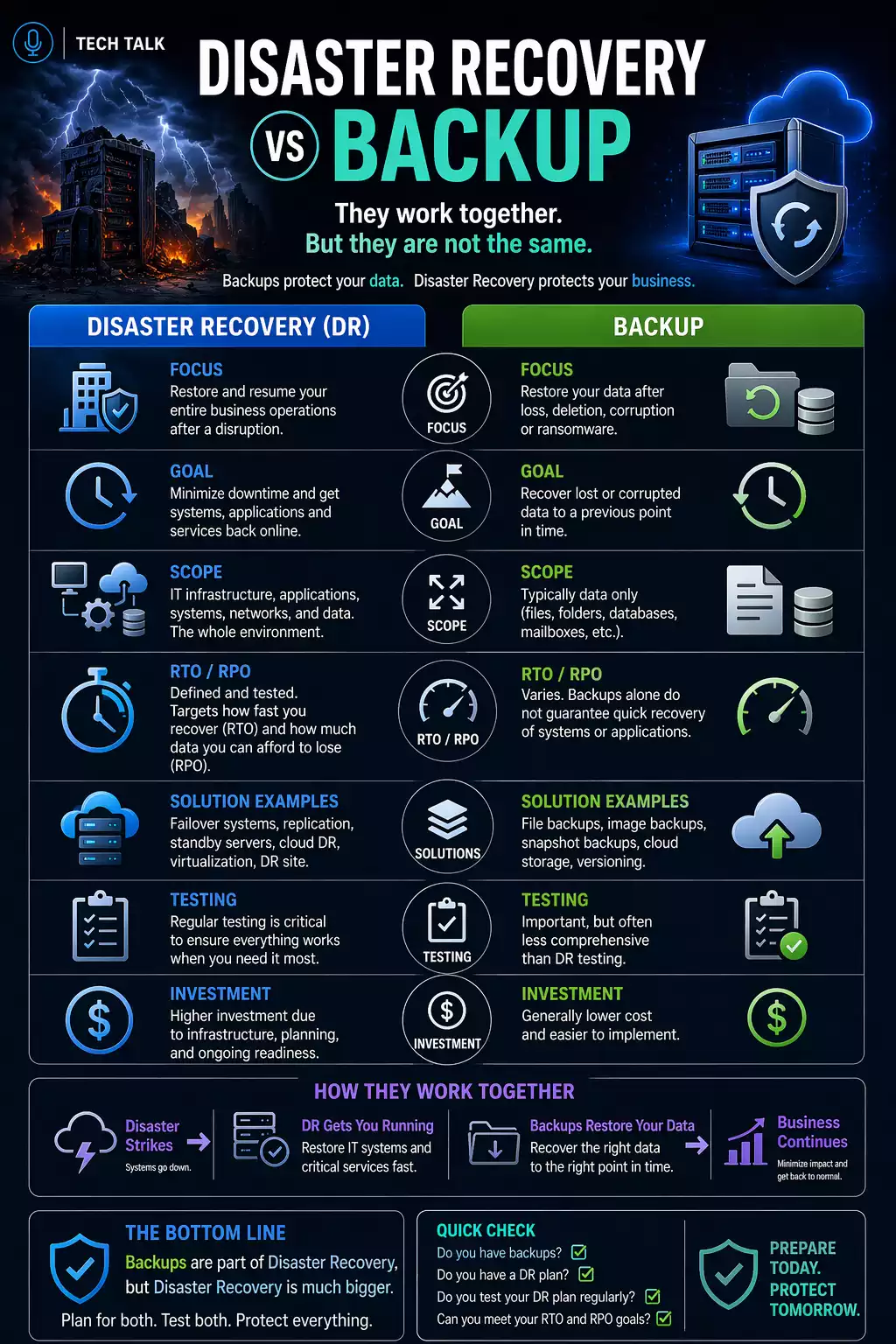
Backups store data — disaster recovery restores your business.
What a Real Incident Looks Like
A typical failure scenario:
- systems go offline unexpectedly
- teams scramble to assess the situation
- backups are located
- recovery begins
- issues appear (slow restore, missing dependencies, unclear process)
- recovery takes longer than expected
During this time:
- employees cannot work
- operations are disrupted
- business impact increases
Having backups does not mean you can recover quickly — or at all.
What Is Backup
Backup is the process of creating copies of data.
It focuses on:
- storing data
- preserving information
- enabling restoration of files or systems
Backups answer the question:
👉 “Do we have a copy of our data?”
What Backup Does Well
- protects against data loss
- enables file-level recovery
- provides historical versions of data
What Backup Does NOT Do
Backup does not:
- define recovery processes
- ensure fast restoration
- guarantee system functionality after restore
Backup answers “Do we have data?” — not “Can we recover operations?”
What Is Disaster Recovery
Disaster recovery is the process of restoring systems, applications, and operations after an incident.
It focuses on:
- how systems are restored
- how quickly recovery occurs
- how business operations resume
Disaster recovery answers:
👉 “How do we get back to normal?”
What Disaster Recovery Includes
- recovery procedures
- system prioritization
- defined roles and responsibilities
- recovery timelines (RTO)
- acceptable data loss (RPO)
Backup vs Disaster Recovery (Side-by-Side)
Backup
- Stores copies of data
- Focuses on data protection
- Ensures data exists
Disaster Recovery
- Restores systems and operations
- Focuses on execution
- Ensures business continuity
Backup is a tool. Disaster recovery is a process.
Why Backup Alone Is Not Enough
Even with backups:
- recovery may be slow
- systems may not function correctly
- dependencies may delay restoration
Common issues include:
- unclear recovery steps
- lack of system prioritization
- untested recovery processes
Without a recovery plan, backups can still lead to extended downtime.
The Execution Gap (Where Most Fail)
The biggest difference between backup and disaster recovery is execution.
During an incident:
- backups provide data
- disaster recovery defines how that data is used
Recovery requires:
Detection
- identifying the issue
Assessment
- determining affected systems
Restoration
- rebuilding systems
Validation
- confirming functionality
Operational Recovery
- resuming business processes
Recovery is a coordinated process — not a single action.
Why Recovery Often Takes Longer Than Expected
Even with backups, delays occur due to:
- large data volumes
- network limitations
- system dependencies
- lack of coordination
Recovery delays are often caused by process and complexity — not just technology.
How Ransomware Exposes the Difference
Ransomware highlights the gap clearly.
- backups may exist
- but recovery may still fail
If backups are:
- compromised
- untested
- incomplete
then disaster recovery becomes impossible.
Ransomware tests your recovery plan — not just your backups.
See ransomware recovery.
What a Complete Strategy Looks Like
A complete approach includes both:
Backup
- data protection
- redundancy
- retention
Disaster Recovery
- recovery planning
- execution procedures
- testing and validation
This aligns with a full
backup and recovery strategy.
How to Know If You Have a Gap
You may be at risk if:
- you have backups but no recovery plan
- you have never tested a full recovery
- you do not know recovery timelines
- roles and responsibilities are unclear
If you cannot describe how your business would recover step-by-step, you do not have a disaster recovery plan.
What This Means for Your Business
Backups are necessary — but not sufficient.
Disaster recovery is what determines whether your business can survive an incident.
The effectiveness of your recovery strategy is measured by how quickly your business can resume operations.
Final Thoughts
Understanding the difference between backup and disaster recovery is critical.
One protects your data.
The other protects your business.
Need help with this topic?
Make sure your backups actually work when it matters.
Most businesses discover backup failures during an outage. We help you validate recovery, reduce downtime risk, and build a system that works under pressure.
- Backup validation and testing
- Recovery time optimization
- Clear recovery documentation


