
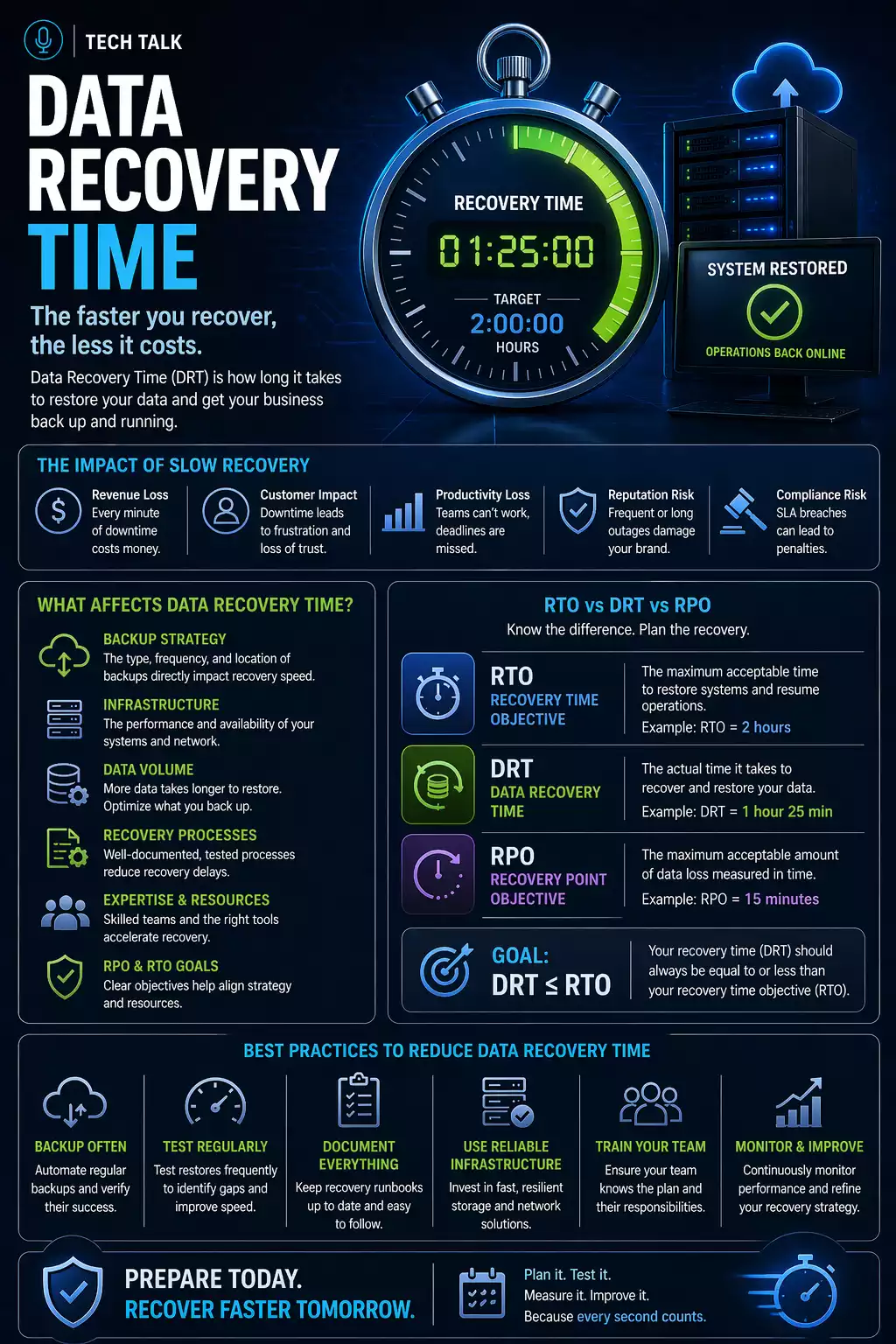
Why Recovery Time Matters
Most businesses assume they can recover quickly from data loss.
That assumption is rarely accurate.
Recovery time determines:
- how long your business is down
- how much revenue is lost
- how severely operations are disrupted
Recovery time is often much longer than expected — especially when systems have never been tested.
What a Real Recovery Scenario Looks Like
A typical recovery situation looks like this:
- a failure occurs (ransomware, hardware failure, or human error)
- systems go offline
- backups are located and evaluated
- recovery begins
- issues are discovered (missing data, slow transfer, system dependencies)
- recovery takes longer than expected
During this time:
- operations are disrupted
- employees cannot work
- customers may be impacted
Recovery is rarely a single step — it is a multi-phase process that introduces delays at every stage.
The Phases of Recovery (Why It Takes Time)
Recovery is not just “restore and go.”
It typically involves:
1. Detection and Response
- identifying the issue
- confirming scope of impact
2. Backup Validation
- confirming backups are usable
- identifying the correct restore point
3. Data Restoration
- transferring data
- rebuilding systems
4. System Validation
- verifying applications work
- confirming data integrity
5. Operational Recovery
- bringing users back online
- restoring business processes
Each phase introduces time delays — even when backups are working correctly.
What Actually Affects Recovery Time
Recovery speed is not determined by backups alone.
It depends on multiple factors working together.
1. Backup Quality and Availability
Recovery depends on having usable backups.
If backups are:
- incomplete
- corrupted
- inaccessible
then recovery is delayed or may fail entirely.
A strong backup strategy is the foundation of recovery speed.
2. Recovery Process and Planning
Without a defined process, recovery becomes slow and chaotic.
You need:
- clear recovery steps
- system prioritization
- defined responsibilities
A structured disaster recovery plan reduces downtime.
3. Backup Location and Infrastructure
Where backups are stored affects how quickly they can be restored.
- local backups → faster recovery
- cloud backups → slower but more resilient
However, speed is limited by infrastructure.
4. Data Size and Bandwidth Limitations
One of the most overlooked factors is data size.
For example:
- restoring a few files → minutes
- restoring hundreds of gigabytes → hours
- restoring multiple terabytes → days
Cloud recovery is limited by:
- internet speed
- network congestion
- provider throughput limits
Large data restores are often limited by bandwidth — not backup systems.
5. Testing and Validation
If recovery has never been tested:
- timelines are unknown
- issues are discovered during downtime
- recovery takes longer than expected
Untested backups significantly increase recovery time.
Learn more about how often to test backups.
6. System Dependencies
Modern systems are interconnected.
This means:
- applications depend on databases
- services depend on network infrastructure
- users depend on multiple systems
If one component is delayed:
- recovery is delayed
Recovery is often delayed by dependencies — not the restore process itself.
7. System Complexity
More complex environments take longer to restore.
Factors include:
- number of systems
- integrations
- security configurations
Complex systems require more structured recovery planning.
Typical Recovery Time Ranges
While every environment is different, general ranges include:
- Simple recovery (files only): minutes to hours
- Moderate recovery (single system): hours to a full day
- Full environment recovery: 1–3 days or more
Without preparation, recovery can take significantly longer than these estimates.
Why Businesses Underestimate Recovery Time
Most organizations base expectations on:
- backup completion times
- assumptions about system simplicity
- lack of testing
In reality:
- recovery is more complex than backup
- dependencies create delays
- issues are discovered during restoration
Backup speed does not equal recovery speed.
How to Know If Your Recovery Time Is Too Long
You may have a problem if:
- you do not know how long recovery takes
- you have never tested a full restore
- your systems are not prioritized
- your recovery process is unclear
If you cannot estimate your recovery time, your downtime risk is unknown.
How RTO Defines Recovery Expectations
Recovery time should not be a guess.
It should be defined using RTO (Recovery Time Objective).
RTO sets:
- acceptable downtime
- recovery targets
- system requirements
Without RTO, recovery expectations are undefined.
How to Reduce Recovery Time
Reducing recovery time requires intentional planning.
This includes:
- maintaining reliable backups
- defining recovery procedures
- testing recovery regularly
- prioritizing critical systems
- optimizing infrastructure and bandwidth
The fastest recovery comes from preparation — not reaction.
What This Means for Your Business
Recovery time directly impacts business continuity.
Longer recovery means:
- more downtime
- greater financial loss
- higher operational risk
A complete backup and recovery strategy focuses on minimizing this impact.
Final Thoughts
Recovery is not just about restoring data.
It is about restoring your business as quickly as possible.
Need help with this topic?
Make sure your backups actually work when it matters.
Most businesses discover backup failures during an outage. We help you validate recovery, reduce downtime risk, and build a system that works under pressure.
- Backup validation and testing
- Recovery time optimization
- Clear recovery documentation


