
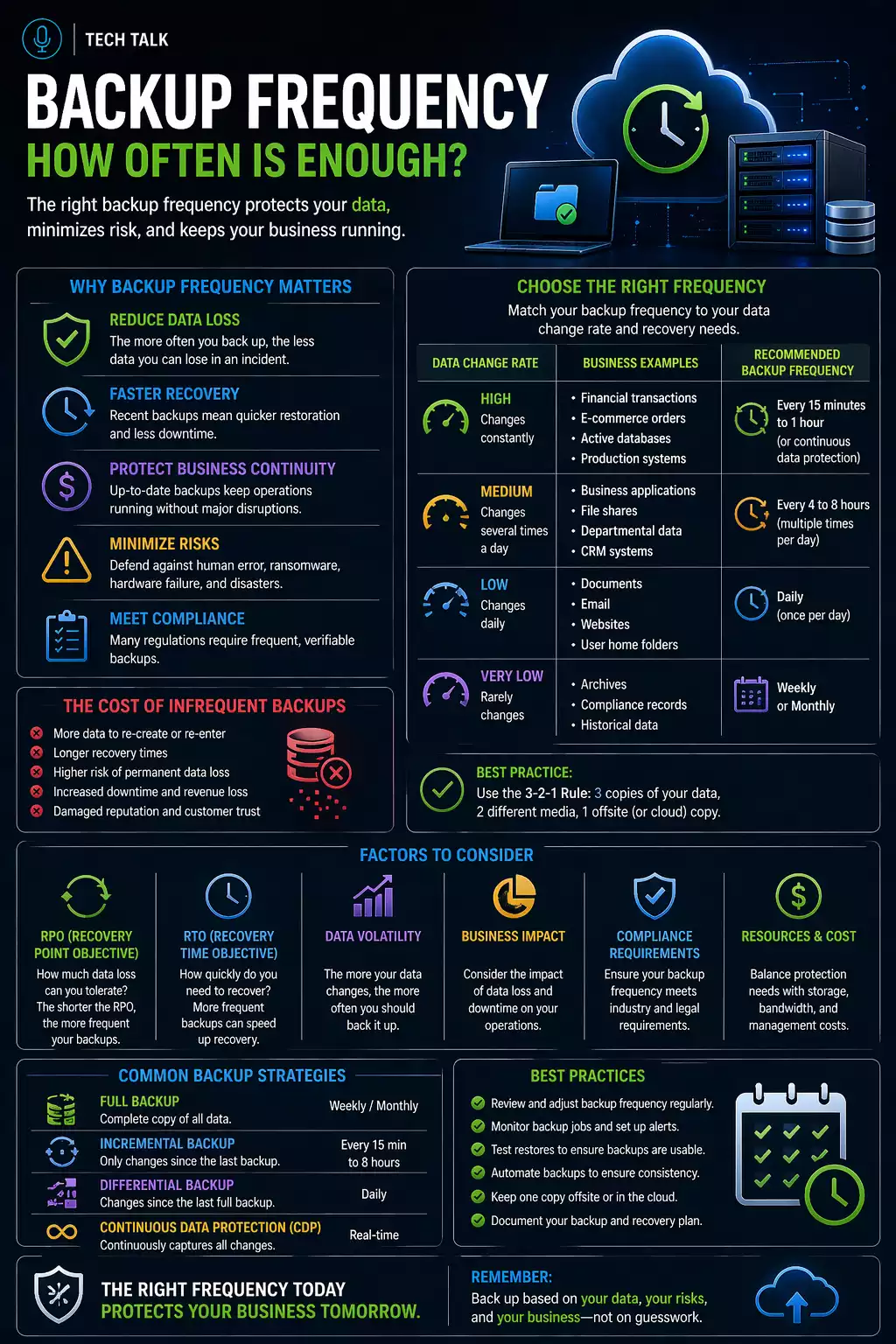
Why Backup Frequency Matters
Backup frequency determines how much data your business can lose during an incident.
Many businesses assume:
- daily backups are enough
- backup schedules do not need to change
- data loss will be minimal
In reality, these assumptions often fail.
Backup frequency directly defines how much work, data, and operational history can be lost.
What a Real Data Loss Scenario Looks Like
A typical scenario:
- a system is backed up once per day
- employees work throughout the day
- a failure occurs late in the afternoon
- recovery begins
- only the previous night’s backup is available
At that point:
- an entire day of work is lost
- data must be recreated manually
- productivity drops significantly
Even small gaps in backup frequency can result in significant data loss.
How Backup Frequency Connects to RPO
Backup frequency is directly tied to
Recovery Point Objective (RPO).
- more frequent backups → less data loss
- less frequent backups → more data loss
For example:
- hourly backups → up to 1 hour of data loss
- daily backups → up to 24 hours of data loss
Your backup frequency defines your maximum possible data loss.
Why Daily Backups Are Often Not Enough
Daily backups are common — but often insufficient.
In modern environments:
- data changes constantly
- systems update frequently
- business operations rely on real-time information
A full day of data loss is unacceptable for many businesses — even if backups are “working.”
What Actually Determines Backup Frequency
Backup frequency should be based on:
1. Data Change Rate
How often your data changes matters most.
- high activity → frequent backups required
- low activity → less frequent backups acceptable
Examples:
- financial systems → frequent changes
- archival data → minimal changes
2. Business Impact of Data Loss
Some data is more critical than others.
Ask:
- how much data loss can your business tolerate?
- what happens if that data is lost?
Backup frequency should be based on business impact — not convenience.
3. System Type
Different systems require different approaches:
- file storage → periodic backups
- databases → frequent or continuous backups
- cloud applications → separate backup strategies
4. Operational Workflow
Consider how your team works:
- constant updates → frequent backups needed
- batch updates → scheduled backups may work
Common Backup Frequency Models
Daily Backups
- simple and common
- higher risk of data loss
Hourly Backups
- reduces data loss
- moderate resource usage
Continuous Backup
- near real-time protection
- minimal data loss
The more critical your data, the more frequently it should be backed up.
What Happens When Frequency Is Too Low
Low frequency creates gaps:
- missing transactions
- lost files
- incomplete records
These gaps often require:
- manual reconstruction
- re-entry of data
- operational delays
What Happens When Frequency Is Too High
More frequent backups are not always better.
Challenges include:
- increased storage requirements
- higher system load
- more complex management
Backup frequency must balance data protection with system performance.
The Hidden Risk: Detection Delay
Backup frequency alone is not enough.
If issues are not detected quickly:
- compromised data may be backed up repeatedly
- clean data may be overwritten
Frequent backups can still fail if compromised data replaces clean data over time.
This is why retention and protection matter alongside frequency.
How Frequency Fits Into a Full Strategy
Backup frequency must work with:
A complete backup strategy balances all of these elements.
How to Know If Your Frequency Is Inadequate
You may have a gap if:
- you are unsure how much data you could lose
- backups run only once per day
- critical systems are not backed up frequently
- recovery has never been tested
If your backup frequency does not match your data usage, your strategy is misaligned.
What This Means for Your Business
Backup frequency is not a technical setting.
It is a business decision that determines:
- how much work can be lost
- how quickly operations can resume
- how severe an incident becomes
The right backup frequency aligns with how your business actually operates.
Final Thoughts
There is no single correct backup frequency.
The right answer depends on:
- your systems
- your data
- your risk tolerance
Need help with this topic?
Make sure your backups actually work when it matters.
Most businesses discover backup failures during an outage. We help you validate recovery, reduce downtime risk, and build a system that works under pressure.
- Backup validation and testing
- Recovery time optimization
- Clear recovery documentation


