
Real-World Scenario: When Local Backup Fails
A failure involving local backup is rarely gradual — it is typically immediate and catastrophic.
A common real-world scenario:
- a ransomware attack spreads laterally across the network
- backup systems remain connected to the same infrastructure
- attackers identify and encrypt backup repositories first
- production systems are encrypted shortly after
- recovery options disappear almost instantly
At that point:
- backup integrity is compromised
- recovery cannot begin locally
- downtime becomes indefinite
In more advanced attacks:
- backups are deleted before encryption begins
- administrative credentials are used to disable recovery tools
- monitoring systems are bypassed entirely
Local backups fail not because they don’t exist — but because they exist in the same environment as the failure.
The core issue is exposure.
If backups are reachable, they are vulnerable.
Real-World Scenario: When Cloud Backup Falls Short
Cloud backup solves survivability — but introduces operational limitations that often go underestimated.
A typical recovery scenario:
- a major outage or ransomware event occurs
- full data restoration is required
- terabytes of data must be downloaded
- bandwidth becomes the limiting factor
As recovery begins:
- restore speeds are constrained by internet throughput
- critical systems compete for limited bandwidth
- partial recovery delays core operations
In real-world conditions:
- restoring 5–10 TB can take days
- restoring larger environments may take significantly longer
- users may regain access slowly rather than all at once
Additional complications may include:
- cloud egress costs during large restores
- provider throttling during peak demand
- dependency on stable internet connectivity
Cloud backups protect your data — but recovery speed can become the bottleneck that impacts your business.
The issue is not protection.
It is time to recovery under pressure.
How Modern Backup Systems Are Actually Designed
High-performing backup strategies are not built on a single choice.
They are layered systems designed for failure.
A modern architecture typically includes:
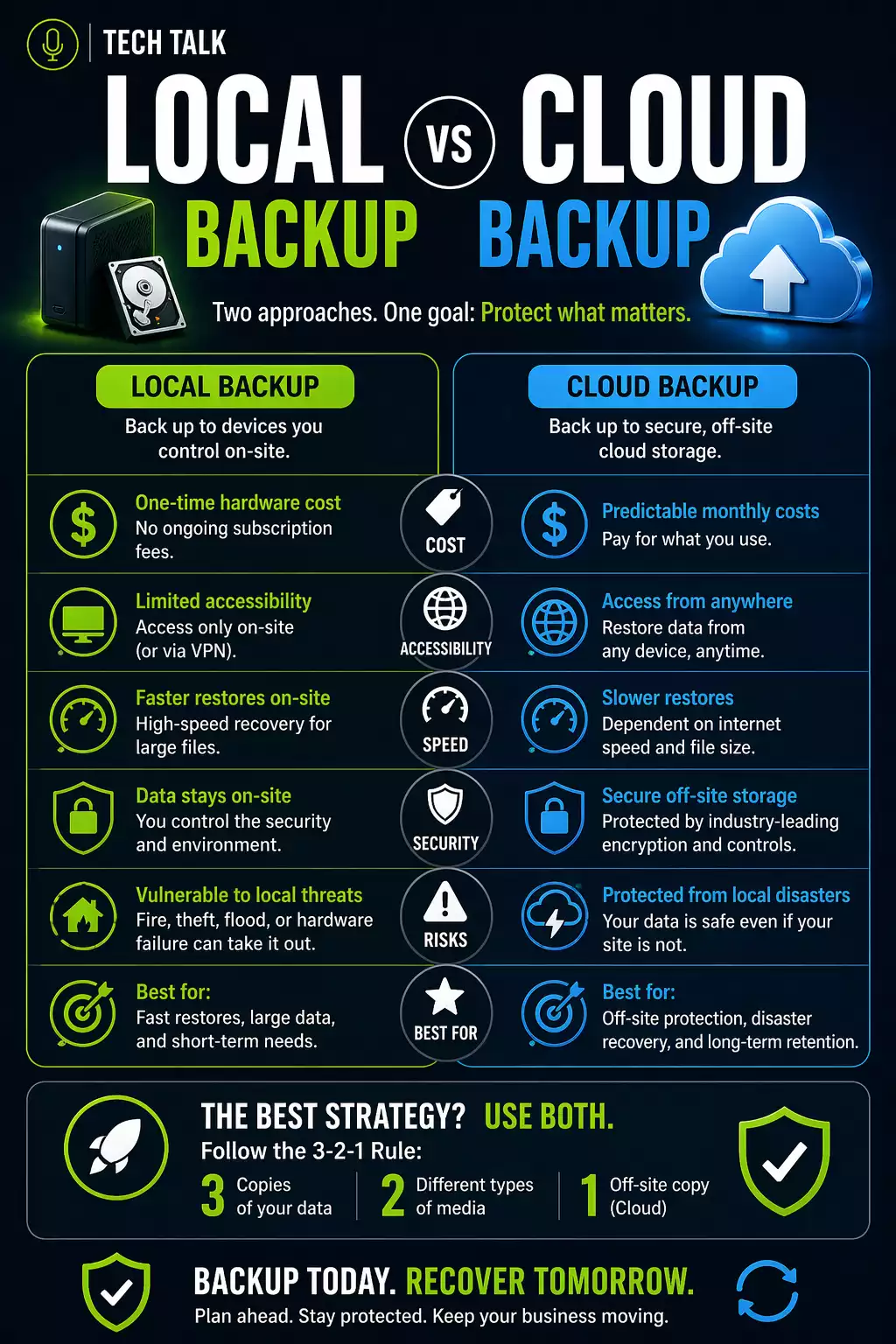
- local backup for fast recovery
- cloud backup for disaster protection
- isolated or immutable storage for security
This model is commonly known as:
👉 3-2-1 backup strategy
- 3 copies of data
- 2 different storage types
- 1 offsite copy
Modern backup systems are engineered for worst-case scenarios — not convenience.
Each layer exists to solve a different failure mode.
Performance vs Protection Trade-Off
Every backup decision introduces trade-offs.
Local Backup Optimizes:
- speed of recovery
- immediate access
- operational continuity
Cloud Backup Optimizes:
- data survivability
- disaster protection
- long-term retention
No single system optimizes both speed and survivability — which is why relying on one creates risk.
The goal is not choosing one.
It is balancing both.
What Happens If You Choose Only One
Local Only
- fast recovery in minor incidents
- complete failure in major compromises
- high risk of total data loss
Cloud Only
- strong protection against catastrophic loss
- slower recovery times
- prolonged operational disruption
Choosing only one backup method forces a trade-off your business will eventually experience during a real incident.
How to Design for Real Recovery
A complete backup system must answer:
- how quickly must systems be restored?
- how much data loss is acceptable?
- what happens if your primary environment is compromised?
These questions define:
- Recovery Time Objective (RTO)
- Recovery Point Objective (RPO)
See:
Backup strategy is not about storage — it is about meeting recovery expectations under real-world conditions.
What This Means in a Real Incident
When failure actually occurs:
- local backups determine how fast you recover
- cloud backups determine whether recovery is possible
Without local backup:
- recovery is slow
Without cloud backup:
- recovery may be impossible
Recovery speed determines business impact — backup design determines whether recovery happens at all.
Final Thoughts
The question is not:
👉 local vs cloud
The real question is:
👉 are you prepared for both speed and failure?
A resilient strategy does not choose one.
It combines both — deliberately, intentionally, and with real-world failure in mind.
Need help with this topic?
Make sure your backups actually work when it matters.
Most businesses discover backup failures during an outage. We help you validate recovery, reduce downtime risk, and build a system that works under pressure.
- Backup validation and testing
- Recovery time optimization
- Clear recovery documentation


