What Backup Validation Really Means
Backup validation is the process of confirming that your backups:
- exist
- are complete
- are not corrupted
- can be successfully restored
This is where many businesses get it wrong.
Backups are treated as a checkbox — not a tested system.
If you need broader context, start with recovery testing runbooks.
If you haven’t restored your backups, you don’t actually know if they work.
Why Backup Validation Matters
Backup failure is one of the most common causes of extended downtime.
Not because backups don’t exist —
but because they haven’t been validated.
When systems fail:
- backups may be incomplete
- recovery may take too long
- critical data may be missing
This becomes especially dangerous in ransomware scenarios outlined in ransomware readiness 60-minute executive checklist.
What “Bad” Backup Validation Looks Like
A weak environment typically includes:
- backups run automatically but are never tested
- no one has performed a full restore
- recovery steps are undocumented
- success is assumed based on logs
At that point:
- recovery is uncertain
- downtime risk increases
- business continuity is compromised
These gaps are common in organizations lacking incident response plan basics.
Backup failure is usually discovered during a crisis — not during routine operations.
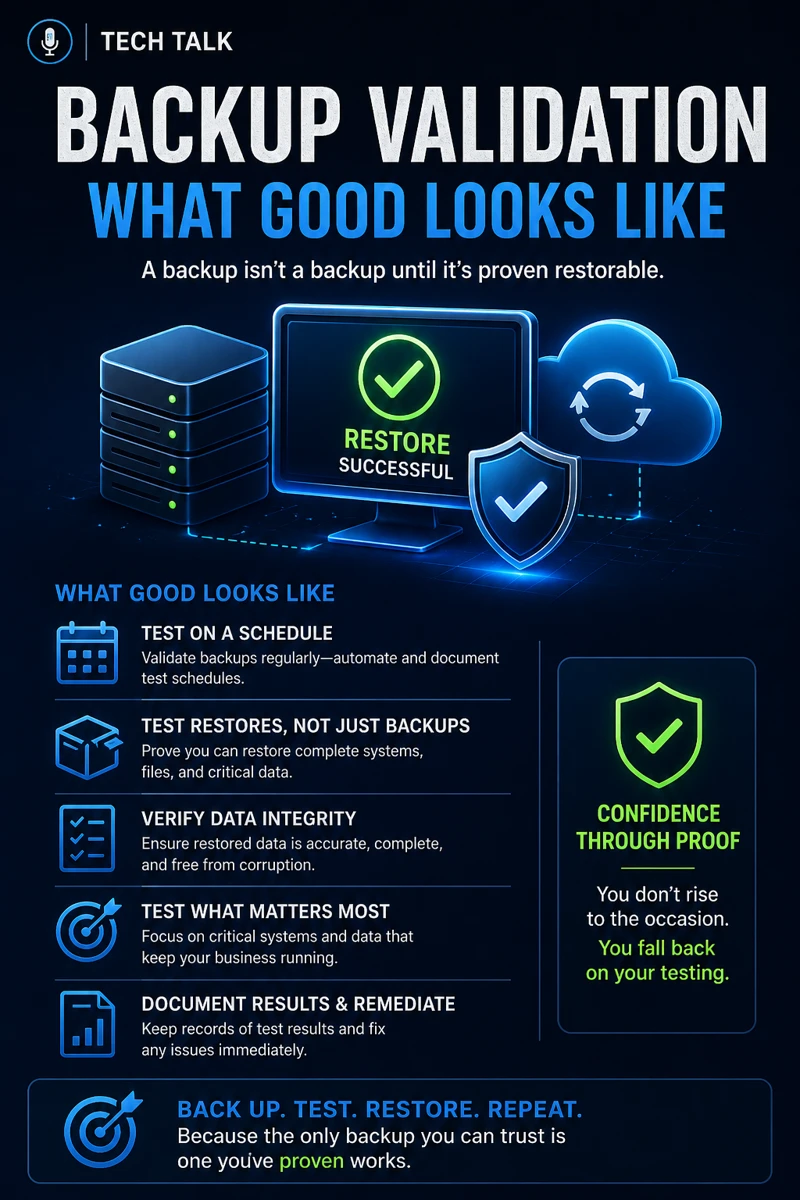
What “Good” Backup Validation Looks Like
A strong backup validation process includes:
- scheduled restore testing
- data integrity verification
- documented recovery procedures
- defined recovery objectives
Regular Restore Testing
Validation requires real-world testing.
This includes:
- full system restores
- file-level recovery
- application-level recovery
This aligns with recovery testing runbooks.
Data Integrity Verification
Backups must be checked for corruption.
This includes:
- checksum validation
- integrity testing
Documented Recovery Process
Recovery must be repeatable.
This includes:
- step-by-step procedures
- defined roles and responsibilities
Defined Recovery Objectives
You must define:
- Recovery Time Objective (RTO)
- Recovery Point Objective (RPO)
Good backups are proven through recovery — not assumed through automation.
The Hidden Risk: False Confidence
One of the biggest dangers is believing:
- “backups are running, so we’re safe”
In reality:
- backup jobs can fail silently
- storage limits can interrupt backups
- permissions can break restore processes
This false confidence is often exposed during audits tied to cyber insurance controls.
Most businesses overestimate the reliability of their backups.
What Breaks Backup Reliability
Backup systems fail more often than expected.
Common causes include:
- storage capacity issues
- failed or skipped backup jobs
- corrupted backup files
- misconfigured retention policies
These issues often overlap with broader gaps in patch management smb.
The Role of Backup Validation in Ransomware Defense
Backup validation is one of the most critical controls in ransomware recovery.
Without validated backups:
- recovery may fail
- attackers gain leverage
- downtime increases dramatically
Most ransomware incidents begin with vectors covered in phishing defense real world.
Unverified backups turn ransomware into a business-critical event.
The Role of Automation vs Testing
Automation is helpful — but incomplete.
Automation handles:
- scheduling backups
- sending alerts
- monitoring job success
But it does NOT confirm:
- recoverability
- usability of data
Testing is the only way to validate.
The Complexity of Modern Backup Environments
Today’s environments include:
- cloud platforms
- SaaS applications
- hybrid infrastructure
This creates:
- multiple backup systems
- inconsistent recovery processes
These complexities align with challenges in endpoint security basics edr vs antivirus.
What a Mature Backup Validation Process Looks Like
A mature organization will have:
- quarterly or monthly recovery tests
- documented recovery workflows
- assigned accountability
- clearly defined recovery metrics
This should integrate with broader incident response plan basics.
Backup validation should be treated as an ongoing operational process — not a one-time task.
How Backup Validation Impacts Business Operations
Backup validation directly affects:
- downtime duration
- data loss severity
- recovery confidence
Without it:
- outages last longer
- recovery becomes unpredictable
- business risk increases
Unvalidated backups turn manageable incidents into major disruptions.
How to Know If Your Backups Are Not Validated
You may have a problem if:
- no one has performed a test restore
- recovery time is unknown
- backup logs are the only validation
- recovery steps are unclear
If you haven’t tested recovery, your backups should be considered unverified.
How to Improve Backup Validation
Start with:
- performing controlled restore tests
- documenting recovery procedures
- scheduling recurring validation
- defining RTO and RPO targets
These steps align directly with recovery testing runbooks.
How This Connects to Other Cybersecurity Topics
Backup validation connects to:
- incident response plan basics
- ransomware readiness 60-minute executive checklist
- recovery testing runbooks
- cyber insurance controls
- phishing defense real world
What This Means for Your Business
Your backup validation process determines:
- whether recovery is possible
- how long outages last
- how much data is lost
It is not optional.
It is foundational.
Backups are only valuable if they can be restored quickly and reliably.
Final Thoughts
Backup validation is one of the most overlooked areas of cybersecurity.
But it is also one of the most important.
When done correctly:
- recovery becomes predictable
- downtime is minimized
- risk is controlled
Need help with this topic?
Make sure your backups actually work when it matters.
Most businesses discover backup failures during an outage. We help you validate recovery, reduce downtime risk, and build a system that works under pressure.
- Backup validation and testing
- Recovery time optimization
- Clear recovery documentation