Why Conditional Access Matters
Passwords are no longer enough to protect business systems.
Attackers target:
- email accounts
- Microsoft 365 logins
- cloud applications
- administrator accounts
- remote access tools
Once an account is compromised, attackers may be able to access:
- sensitive files
- email history
- client information
- internal systems
- financial workflows
That is why businesses need access rules based on context.
👉 Conditional access helps decide whether a login should be allowed, challenged, limited, or blocked.
If every sign-in is treated the same, your business may be giving high-risk logins the same access as trusted users.
What Is Conditional Access?
Conditional access is a security approach that evaluates sign-in conditions before allowing access.
Instead of asking only:
👉 Is the password correct?
Conditional access asks:
- Who is signing in?
- What device are they using?
- Where are they signing in from?
- What application are they accessing?
- Is the sign-in risky?
- Is stronger verification required?
Based on those conditions, the system can:
- allow access
- require MFA
- block access
- limit access
- require a compliant device
Why Conditional Access Is Important for Microsoft 365
For many businesses, Microsoft 365 is where critical work happens.
It may contain:
- Teams conversations
- SharePoint files
- OneDrive documents
- calendars
- client records
- financial communications
If Microsoft 365 access is weak, attackers have a direct path into daily business operations.
Conditional access helps protect Microsoft 365 by adding smarter controls around login behavior.
Related reading:
Conditional access is one of the most practical ways to reduce identity risk because it protects the sign-in process itself.
Conditional Access vs MFA
Conditional access and multi-factor authentication are related, but they are not the same.
MFA
MFA verifies identity using an additional factor, such as:
- authenticator app approval
- security key
- text code
- phone prompt
Conditional Access
Conditional access decides when MFA or another control should be required.
For example:
- trusted office device → allow access
- unfamiliar country → block access
- administrator login → require MFA
- unmanaged device → restrict access
MFA is a control.
Conditional access is the decision engine that applies the control.
Why Businesses Should Not Use One-Size-Fits-All Access
A one-size-fits-all login policy creates problems.
If rules are too loose:
- attackers have more opportunity
- risky logins may be allowed
- stolen passwords become more dangerous
If rules are too strict:
- users get frustrated
- productivity slows down
- support tickets increase
The goal is balance:
👉 stronger controls where risk is higher, smoother access where risk is lower.
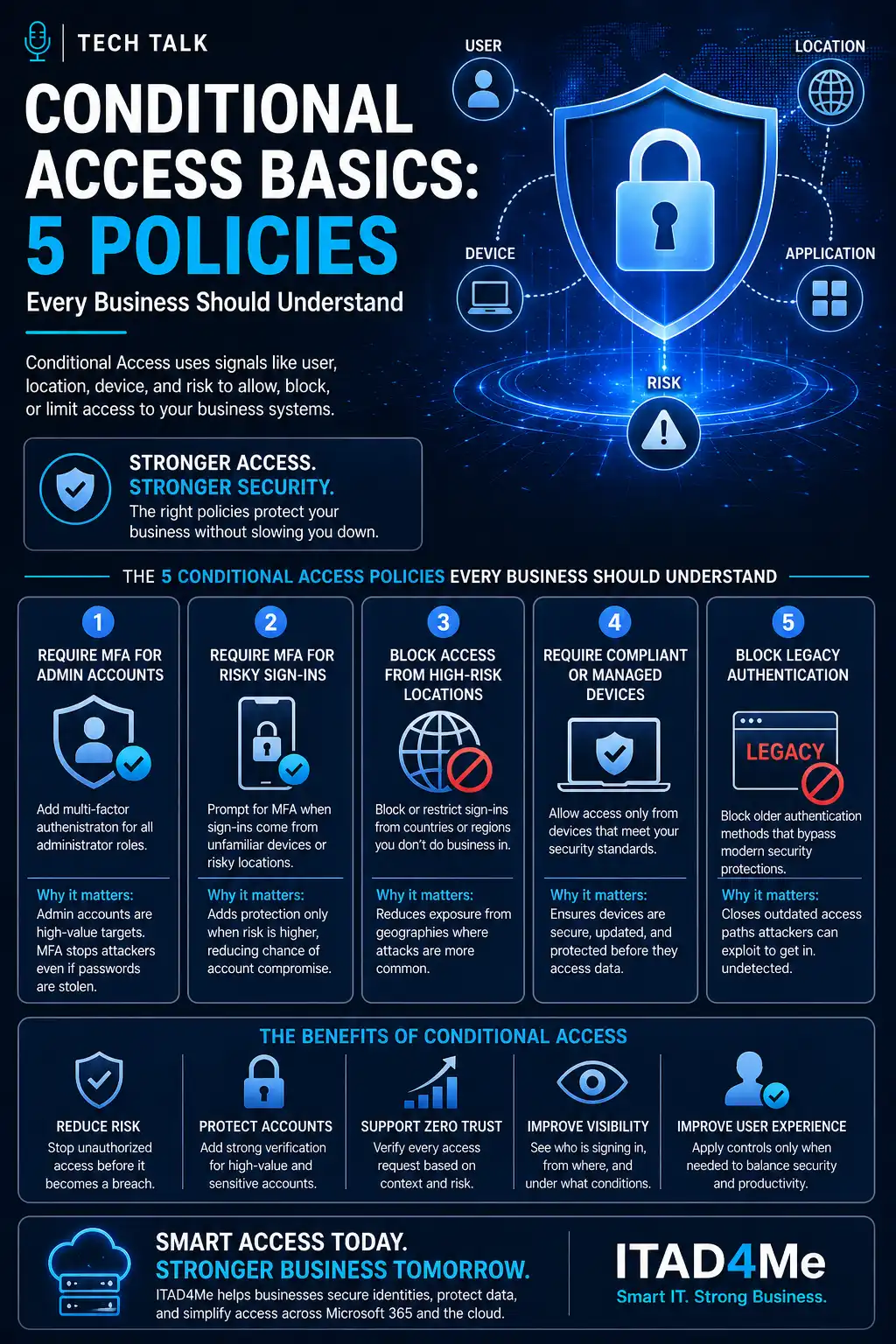
The 5 Conditional Access Policies Every Business Should Understand
These five policies are practical starting points for most businesses.
They do not replace a full identity security strategy, but they create a stronger foundation.
1. Require MFA for Administrator Accounts
Administrator accounts are high-value targets.
They can often:
- reset passwords
- create users
- access sensitive systems
- change security settings
- disable protections
If an administrator account is compromised, the impact can be severe.
A conditional access policy should require MFA for admin roles.
This helps ensure:
- privileged access is strongly verified
- stolen passwords are less useful
- admin actions are better protected
Administrator accounts should never rely on passwords alone.
2. Require MFA for Risky or Unfamiliar Sign-Ins
Not every login carries the same level of risk.
Examples of higher-risk sign-ins include:
- unusual location
- unfamiliar device
- impossible travel behavior
- anonymous proxy use
- suspicious login pattern
Conditional access can require MFA when risk increases.
This protects users without forcing unnecessary prompts all the time.
The goal is:
👉 challenge suspicious access before it becomes a compromise.
3. Block Access from High-Risk Locations
Some businesses do not need logins from certain countries or regions.
If users only work from:
- Dallas-Fort Worth
- Texas
- the United States
- approved travel locations
Then access from unexpected regions may represent unnecessary risk.
A location-based conditional access policy can:
- block access from high-risk locations
- limit sign-ins to approved regions
- require extra verification for travel scenarios
This is especially useful for businesses with predictable work locations.
4. Require Compliant or Managed Devices
Passwords and MFA help verify the user.
But the device matters too.
A compromised or unmanaged device may have:
- malware
- outdated software
- missing security updates
- no disk encryption
- weak endpoint protection
Conditional access can require devices to meet security standards before accessing business systems.
This may include:
- managed device enrollment
- compliant device status
- current operating system
- encryption enabled
- endpoint protection active
Related service:
Access security should evaluate both the user and the device.
5. Block Legacy Authentication
Legacy authentication is dangerous because it may not support modern security controls.
Older protocols can bypass stronger protections such as MFA.
Examples may include older email or application connection methods.
If legacy authentication is enabled, attackers may attempt to use it to access accounts without triggering modern protections.
Blocking legacy authentication helps:
- reduce account compromise risk
- enforce modern sign-in controls
- close outdated access paths
This is one of the most important identity security improvements businesses can make.
How Conditional Access Supports Zero Trust
Zero Trust is built around a simple idea:
👉 never trust automatically, always verify
Conditional access supports this by evaluating each sign-in based on context.
It helps enforce:
- least privilege
- stronger verification
- device trust
- risk-based access
- application-specific controls
Related reading:
Conditional access is not the entire Zero Trust strategy, but it is one of the most useful starting points.
Common Conditional Access Mistakes
Avoid these mistakes:
- enabling policies without testing
- applying strict rules to all users immediately
- forgetting emergency access accounts
- failing to exclude break-glass accounts safely
- not communicating changes to users
- relying only on passwords
- allowing legacy authentication
- ignoring unmanaged devices
These mistakes can create:
- lockouts
- user frustration
- security gaps
- support overload
Conditional access improves security only when policies are planned, tested, and monitored.
How to Roll Out Conditional Access Safely
A safe rollout should include:
- inventory users and applications
- identify administrator accounts
- define trusted locations
- review device management readiness
- test policies with a pilot group
- monitor sign-in logs
- communicate user impact
- phase policies gradually
- maintain emergency access procedures
The goal is not to create friction.
The goal is to reduce risk while keeping business operations stable.
Signs Your Business Needs Conditional Access
Warning signs include:
- MFA is not required for all admins
- users can log in from anywhere
- unmanaged devices access company email
- legacy authentication is still allowed
- suspicious sign-ins are not reviewed
- password resets are frequent
- no clear access policy exists
If these are present, identity risk may be higher than it appears.
What This Means for Your Business
Conditional access helps protect the systems businesses rely on every day.
It improves security by controlling access based on:
- identity
- risk
- location
- device
- application
When implemented correctly, conditional access can:
- reduce account compromise risk
- strengthen Microsoft 365 security
- protect administrator accounts
- improve visibility into sign-ins
- support Zero Trust security
Conditional access turns login security from a simple password check into a smarter risk-based decision.
Final Thoughts
Modern businesses need more than passwords.
They need access controls that understand context.
Conditional access helps answer the most important login question:
👉 Should this user, on this device, from this location, access this system right now?
That question matters because one compromised account can create major business risk.
With the right policies, businesses can protect accounts, reduce exposure, and improve security without creating unnecessary friction.
Next Step
If your Microsoft 365 environment does not have strong conditional access policies in place, now is the time to review your identity security posture.
Start by checking:
- administrator MFA
- risky sign-in controls
- location restrictions
- device compliance requirements
- legacy authentication settings
Need help with this topic?
Make sure your backups actually work when it matters.
Most businesses discover backup failures during an outage. We help you validate recovery, reduce downtime risk, and build a system that works under pressure.
- Backup validation and testing
- Recovery time optimization
- Clear recovery documentation