What EDR vs Antivirus Really Means
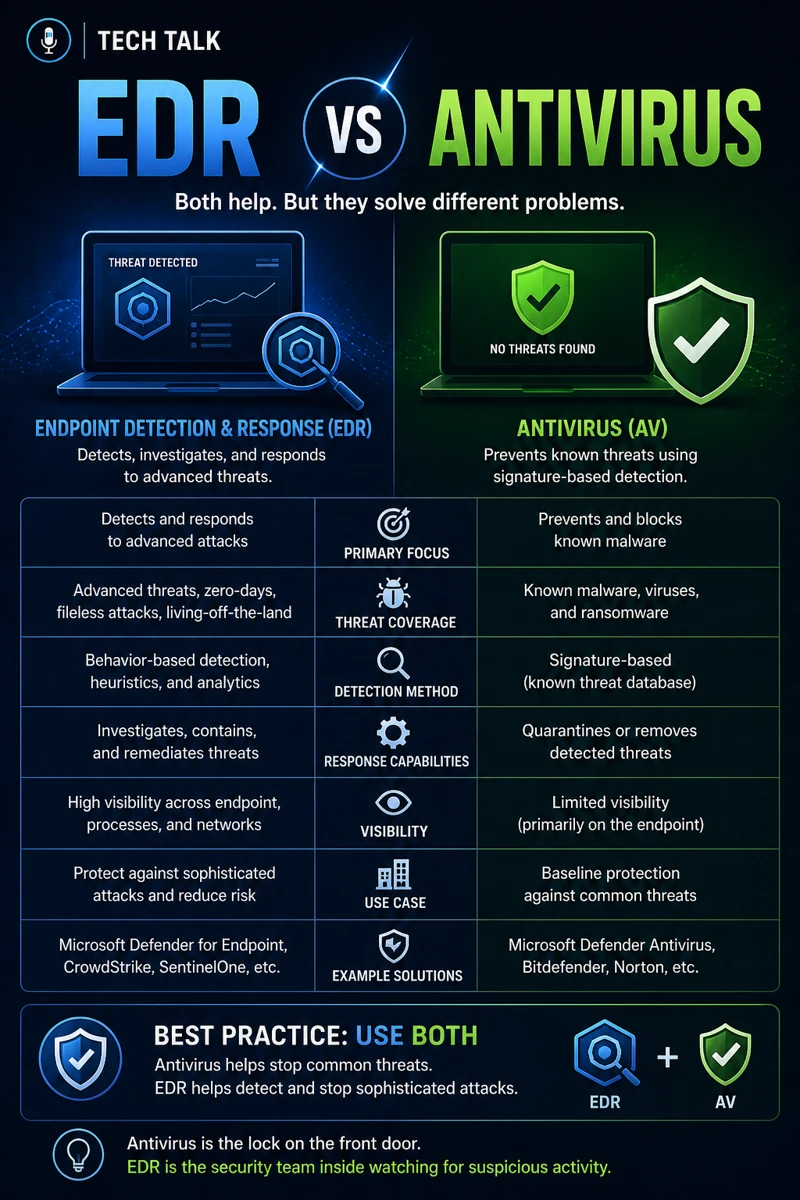
EDR (Endpoint Detection and Response) and antivirus are both designed to protect endpoints.
But they operate very differently.
Antivirus:
- focuses on known threats
- uses signatures to detect malware
EDR:
- monitors behavior
- detects suspicious activity
- enables response and investigation
If you need broader context, start with endpoint security basics edr vs antivirus.
Traditional antivirus alone is no longer enough to stop modern attacks.
Why This Comparison Matters
Many businesses still rely on:
- legacy antivirus solutions
- outdated security models
But today’s threats:
- evolve quickly
- bypass signature detection
- target user behavior
This makes understanding EDR critical for modern protection.
What Antivirus Does
Antivirus is designed to:
- detect known malware
- block malicious files
- scan systems for threats
Strengths of Antivirus
- simple to deploy
- effective against known threats
- low resource usage
Limitations of Antivirus
- cannot detect unknown threats
- relies on signatures
- limited visibility
These gaps are often exploited in attacks like business email compromise.
Antivirus protects against what is already known — not what is new or evolving.
What EDR Does
EDR goes beyond detection.
It provides:
- continuous monitoring
- behavioral analysis
- threat detection
- response capabilities
Key Capabilities of EDR
- detects suspicious activity
- identifies lateral movement
- enables rapid response
- provides forensic visibility
Strengths of EDR
- detects unknown threats
- provides real-time visibility
- enables containment and response
Limitations of EDR
- more complex to manage
- requires expertise
- higher cost
EDR focuses on behavior, not just files — making it effective against modern threats.
The Hidden Risk: Thinking Antivirus Is Enough
Many organizations believe:
- “we have antivirus, so we’re protected”
This leads to:
- blind spots
- delayed detection
- increased risk
This misconception is often exposed during audits like cyber insurance controls.
Relying only on antivirus leaves your business exposed to modern attack methods.
How Modern Attacks Bypass Antivirus
Today’s attackers use:
- fileless malware
- phishing-based entry
- credential theft
- living-off-the-land techniques
These techniques:
- do not rely on traditional malware
- evade signature detection
This aligns with attack paths discussed in phishing defense real world.
The Role of EDR in Incident Response
EDR plays a critical role in:
- identifying threats
- isolating affected systems
- analyzing attack behavior
This supports response efforts outlined in incident response plan basics.
Detection without response capability is not enough in modern cybersecurity.
The Role of EDR in Ransomware Defense
EDR helps:
- detect ransomware activity early
- stop encryption processes
- isolate infected systems
This is critical for readiness discussed in ransomware readiness 60-minute executive checklist.
The Role of Patch Management
Even with EDR:
- vulnerabilities must be patched
Unpatched systems remain at risk.
This aligns with patch management smb.
The Complexity of Endpoint Security
Modern endpoint security involves:
- multiple tools
- layered defenses
- continuous monitoring
This complexity is why relying on a single tool is not sufficient.
What a Strong Endpoint Security Strategy Looks Like
A strong strategy includes:
- EDR deployment
- antivirus as a baseline layer
- patch management
- user awareness
It must also align with broader security controls like cyber insurance controls.
EDR should be part of a layered security approach — not a standalone solution.
How This Decision Impacts Business Operations
Your endpoint protection determines:
- how quickly threats are detected
- how effectively incidents are contained
- how much damage occurs
Poor protection leads to:
- extended downtime
- data loss
- financial impact
Endpoint protection directly affects your ability to prevent and respond to attacks.
How to Know If Antivirus Alone Is Not Enough
You may have a gap if:
- you lack visibility into endpoint activity
- threats are detected late
- response capabilities are limited
If you cannot detect or respond to threats in real time, your protection is incomplete.
How to Choose Between EDR and Antivirus
The reality is:
- antivirus alone is outdated
- EDR is required for modern protection
The best approach:
- use antivirus as a baseline
- implement EDR for detection and response
How This Connects to Other Cybersecurity Topics
EDR connects to:
- endpoint security basics edr vs antivirus
- business email compromise
- phishing defense real world
- incident response plan basics
- cyber insurance controls
What This Means for Your Business
Your endpoint protection determines:
- how well you detect threats
- how quickly you respond
- how much damage is prevented
It is not optional.
It is essential.
Modern cybersecurity requires visibility and response — not just detection.
Final Thoughts
Antivirus is not obsolete.
But it is no longer enough.
EDR provides:
- visibility
- detection
- response
Together, they form a stronger defense.
Need help with this topic?
Make sure your backups actually work when it matters.
Most businesses discover backup failures during an outage. We help you validate recovery, reduce downtime risk, and build a system that works under pressure.
- Backup validation and testing
- Recovery time optimization
- Clear recovery documentation