What an Incident Response Plan Really Means
An incident response plan (IRP) is a structured approach to handling cybersecurity incidents.
It defines:
- how incidents are detected
- who responds
- what actions are taken
- how recovery occurs
Without a plan:
- response is delayed
- decisions are inconsistent
- damage increases
If you need related context, see ransomware readiness 60-minute executive checklist.
The first hour of a cybersecurity incident determines the outcome.
Why Incident Response Planning Is Critical
Cyber incidents are not a matter of if — but when.
Without preparation:
- teams react instead of respond
- attackers gain more time
- recovery becomes more difficult
This is especially true in attacks like business email compromise.
The Core Phases of Incident Response
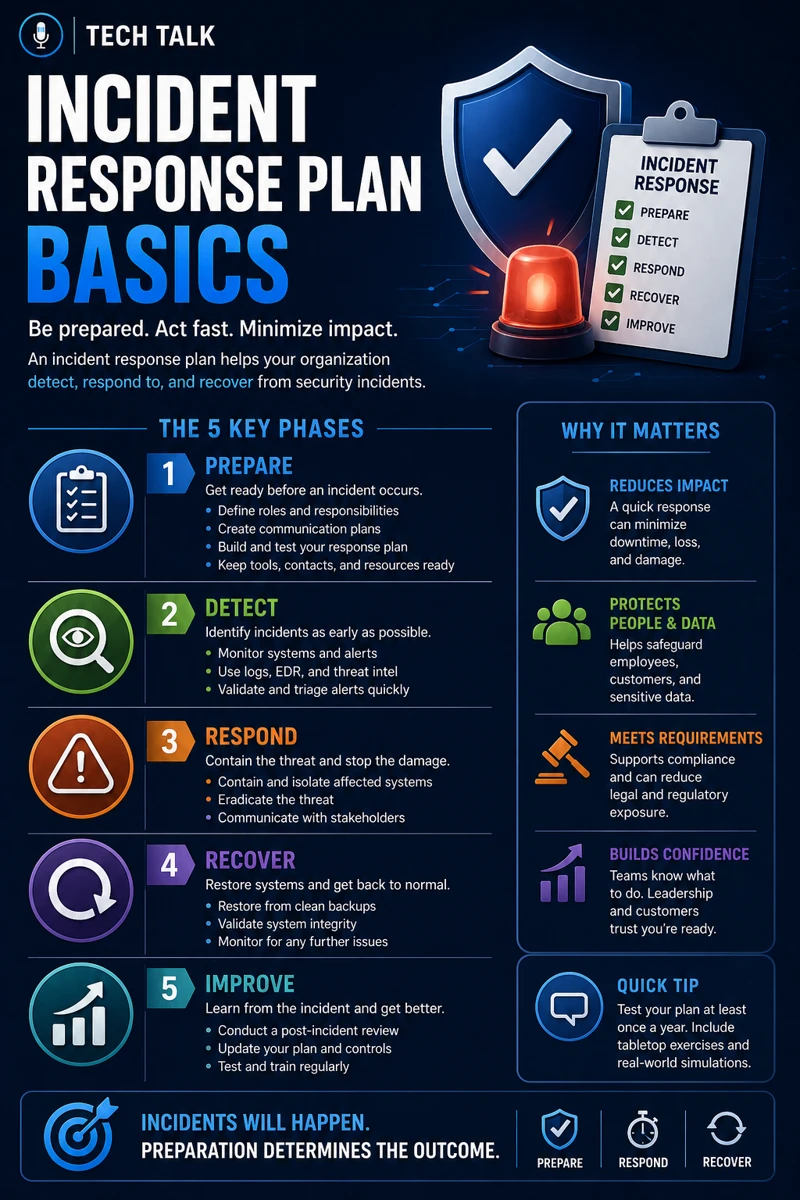
An effective incident response plan follows a structured lifecycle.
1. Preparation
Preparation includes:
- defining roles and responsibilities
- implementing security controls
- creating response procedures
This phase often overlaps with requirements in cyber insurance controls.
2. Detection and Identification
This phase involves:
- identifying suspicious activity
- confirming incidents
Tools like those discussed in endpoint security basics edr vs antivirus play a critical role here.
3. Containment
Containment focuses on:
- limiting the spread
- isolating affected systems
4. Eradication
This phase removes the threat.
This includes:
- deleting malicious files
- closing vulnerabilities
5. Recovery
Recovery restores systems to normal.
This often relies on validated backups from backup validation what good looks like.
6. Lessons Learned
After the incident:
- analyze what happened
- improve processes
- update defenses
A structured response reduces chaos and improves outcomes during an incident.
The Hidden Risk: No Defined Roles
Many organizations:
- lack clear ownership
- do not define responsibilities
This leads to:
- confusion
- delayed decisions
- ineffective response
If no one knows who is responsible, response time increases dramatically.
What Breaks Incident Response
Incident response fails when:
- there is no plan
- plans are not tested
- roles are unclear
- communication is inconsistent
These issues often appear in organizations lacking controls discussed in cyber insurance controls.
The Role of Detection Tools
Detection is critical for response.
This includes:
- EDR solutions
- monitoring systems
These tools are explained in edr vs antivirus.
The Role of Communication
Communication must be:
- clear
- fast
- structured
This includes:
- internal teams
- leadership
- external stakeholders
The Role of Backup and Recovery
Recovery depends on:
- working backups
- tested restore processes
This aligns with recovery testing runbooks.
Recovery speed depends on preparation, not luck.
The Role of User Awareness
Employees play a critical role in:
- identifying threats
- reporting incidents
This is especially important for attacks like those described in phishing defense real world.
The Complexity of Incident Response
Incident response involves:
- technical decisions
- operational coordination
- business impact management
This creates:
- complexity
- pressure
What a Strong Incident Response Plan Looks Like
A strong plan includes:
- documented procedures
- assigned roles
- tested workflows
- defined communication channels
It must also align with:
- detection capabilities
- recovery processes
An incident response plan must be tested regularly to remain effective.
How Incident Response Impacts Business Operations
Response planning directly affects:
- downtime
- financial impact
- reputational damage
Poor response leads to:
- prolonged incidents
- increased loss
- operational disruption
Unprepared organizations experience longer outages and greater losses.
How to Know If You Lack an Incident Response Plan
You may have a gap if:
- roles are unclear
- response steps are undocumented
- no testing has been performed
- communication plans do not exist
If your team has never practiced an incident response scenario, your readiness is low.
How to Build an Incident Response Plan
Start with:
- defining roles and responsibilities
- documenting response procedures
- implementing detection tools
- testing scenarios regularly
These steps align with broader cybersecurity maturity efforts.
How This Connects to Other Cybersecurity Topics
Incident response connects to:
- ransomware readiness 60-minute executive checklist
- backup validation what good looks like
- recovery testing runbooks
- edr vs antivirus
- cyber insurance controls
What This Means for Your Business
Your incident response plan determines:
- how quickly you react
- how much damage occurs
- how fast you recover
It is not optional.
It is essential.
Preparation determines response — and response determines outcome.
Final Thoughts
Cyber incidents happen.
The difference is how you respond.
With a plan:
- response is structured
- impact is reduced
- recovery is faster
Without one:
- chaos takes over
Need help with this topic?
Make sure your backups actually work when it matters.
Most businesses discover backup failures during an outage. We help you validate recovery, reduce downtime risk, and build a system that works under pressure.
- Backup validation and testing
- Recovery time optimization
- Clear recovery documentation