What MFA in Microsoft 365 Really Means
Multi-Factor Authentication (MFA) in Microsoft 365 adds an additional verification step beyond passwords.
This typically includes:
- mobile app approval
- SMS or call verification
- hardware tokens
MFA protects against:
- credential theft
- unauthorized access
But only when configured correctly.
If you need broader context, see why mfa fails.
MFA is one of the most important controls — but also one of the most commonly misconfigured.
Why MFA Is Critical in Microsoft 365
Microsoft 365 is a primary target because it contains:
- email systems
- sensitive data
- user identities
Compromise of a single account can lead to:
- data exposure
- financial fraud
- system access
This is especially true in attacks like business email compromise.
The Biggest Mistake: Partial MFA Deployment
Many organizations:
- enable MFA for some users
- leave others unprotected
This creates:
- easy entry points for attackers
Attackers only need one unprotected account to gain access.
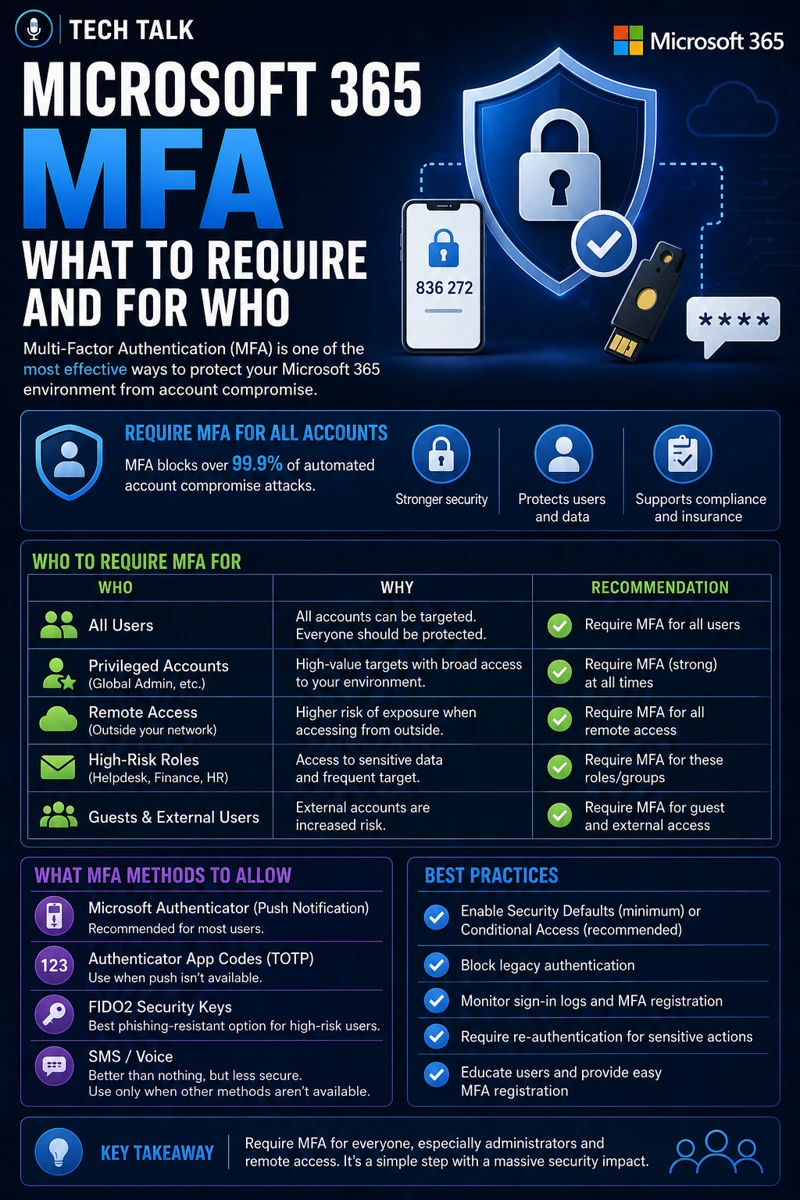
Who Should Be Required to Use MFA
The short answer:
Everyone.
But enforcement should prioritize high-risk roles first.
1. Administrators (Highest Priority)
Admin accounts must always have MFA.
These accounts control:
- user access
- system configuration
- security settings
Without MFA:
- full system compromise is possible
2. Finance and Payroll Teams
These users are targeted for:
- payment fraud
- payroll diversion
This aligns with attacks described in business email compromise.
3. Executives and Leadership
Executives are targeted because:
- they have authority
- their accounts are trusted
4. Remote and Mobile Users
Users accessing systems remotely face:
- higher exposure
- increased risk
5. All Other Users (Baseline Requirement)
All users should eventually have MFA enforced.
This aligns with requirements in cyber insurance controls.
MFA must be universal — but prioritized based on risk.
What to Require: MFA Methods That Actually Work
Not all MFA methods provide equal protection.
Strong MFA Methods
- authenticator apps (Microsoft Authenticator)
- hardware tokens
Weaker MFA Methods
- SMS codes
- phone calls
While still useful, weaker methods are more vulnerable.
These limitations are explained in why mfa fails.
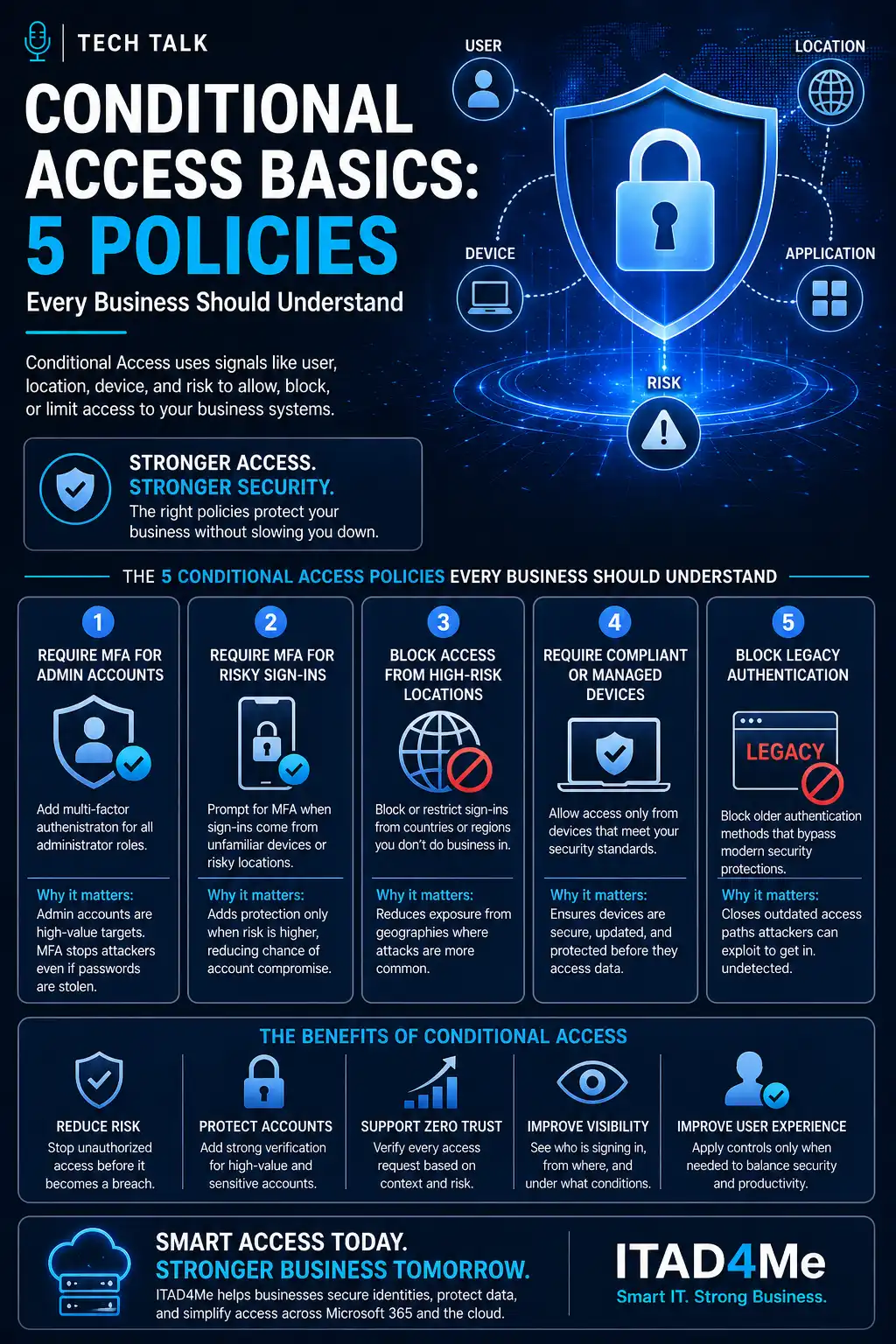
The Role of Conditional Access
Microsoft 365 uses Conditional Access to:
- enforce MFA
- control login behavior
- apply risk-based policies
This allows:
- smarter enforcement
- reduced user friction
The Hidden Risk: MFA Fatigue Attacks
Attackers may:
- repeatedly send MFA prompts
- pressure users to approve
This leads to:
- accidental approval
- account compromise
These techniques are part of broader attack methods discussed in phishing defense real world.
MFA can be bypassed when users are tricked into approving requests.
The Role of Endpoint Security
MFA alone is not enough.
Endpoints must also be protected.
This includes:
- detecting suspicious activity
- preventing malware execution
This aligns with endpoint security basics edr vs antivirus.
The Role of Monitoring and Alerts
Organizations must monitor:
- login activity
- unusual behavior
- failed authentication attempts
This helps:
- detect compromise early
- respond quickly
The Role of Incident Response
If an account is compromised:
- response must be immediate
- access must be revoked
This aligns with incident response plan basics.
The Complexity of MFA Implementation
MFA deployment involves:
- user experience considerations
- security requirements
- system configuration
This creates:
- complexity
- potential misconfigurations
What a Strong MFA Setup Looks Like
A strong Microsoft 365 MFA implementation includes:
- MFA enforced for all users
- stronger methods preferred
- conditional access policies applied
- monitoring enabled
It must also align with:
- overall security strategy
- compliance requirements
MFA should be enforced consistently, monitored continuously, and supported by other security controls.
How MFA Impacts Business Operations
MFA directly affects:
- account security
- access control
- risk exposure
Poor implementation leads to:
- unauthorized access
- increased incidents
- financial loss
MFA failures often lead directly to account compromise.
How to Know If Your MFA Setup Is Weak
You may have a gap if:
- MFA is not enforced for all users
- weaker methods are the default
- login activity is not monitored
- conditional access is not configured
If MFA is inconsistent or optional, your risk exposure is high.
How to Improve Microsoft 365 MFA
Start with:
- enforcing MFA for all users
- prioritizing high-risk roles
- using stronger authentication methods
- configuring conditional access policies
These steps align with broader cybersecurity requirements.
How This Connects to Other Cybersecurity Topics
MFA connects to:
- why mfa fails
- business email compromise
- phishing defense real world
- cyber insurance controls
- incident response plan basics
What This Means for Your Business
Your MFA setup determines:
- how secure user accounts are
- how easily attackers gain access
- how well your organization is protected
It is not optional.
It is essential.
MFA is only effective when it is enforced correctly and consistently.
Final Thoughts
MFA is one of the most important security controls available.
But it must be:
- properly configured
- consistently enforced
- actively monitored
Need help with this topic?
Make sure your backups actually work when it matters.
Most businesses discover backup failures during an outage. We help you validate recovery, reduce downtime risk, and build a system that works under pressure.
- Backup validation and testing
- Recovery time optimization
- Clear recovery documentation