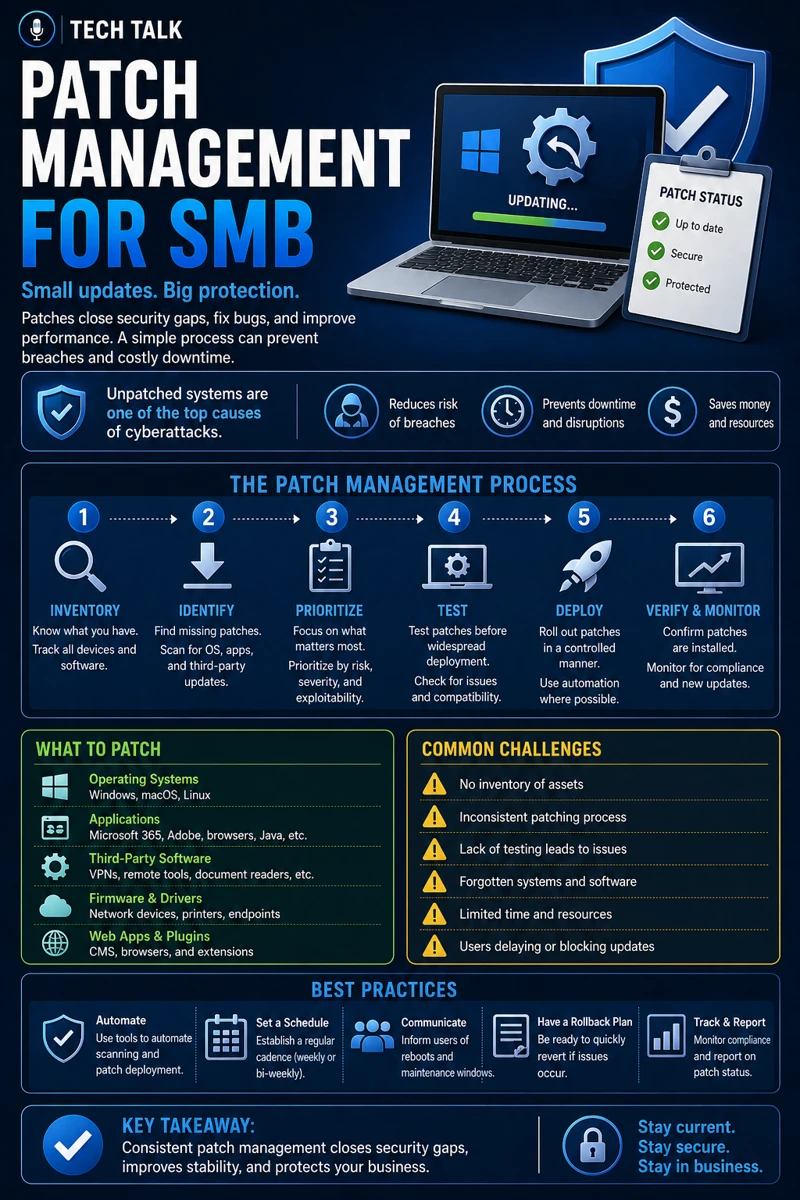
What Patch Management Really Means
Patch management is the process of:
- identifying vulnerabilities
- applying updates
- maintaining secure systems
These updates fix:
- security flaws
- bugs
- performance issues
Without patching:
- systems become vulnerable
- attackers gain easy access
If you need related context, see cyber insurance controls.
Most cyberattacks exploit vulnerabilities that already have available patches.
Why Patch Management Is Critical for SMBs
Small businesses are frequent targets because:
- systems are often outdated
- patching is inconsistent
- resources are limited
This creates:
- predictable vulnerabilities
- easy attack paths
These vulnerabilities are often used in attacks described in phishing defense real world.
The Biggest Risk: Delayed Updates
Many organizations delay patching due to:
- fear of downtime
- lack of process
- limited resources
This leads to:
- prolonged exposure
- increased risk
Every day a patch is delayed is another day attackers can exploit the vulnerability.
What Needs to Be Patched
Patch management applies to:
- operating systems
- applications
- third-party software
- firmware
Ignoring any layer creates risk.
Operating Systems
These include:
- Windows
- macOS
- Linux
Applications
These include:
- browsers
- productivity tools
- business applications
Third-Party Software
Often overlooked but critical.
Firmware and Devices
Includes:
- routers
- firewalls
- hardware systems
Attackers often target the least monitored and least updated systems.
The Hidden Risk: Inconsistent Patching
Many businesses:
- patch some systems
- forget others
This creates:
- uneven protection
- hidden vulnerabilities
This is often revealed during reviews like cyber insurance controls.
The Role of Patch Management in Endpoint Security
Endpoint protection relies on:
- updated systems
- reduced vulnerabilities
Even with advanced tools like those discussed in endpoint security basics edr vs antivirus, unpatched systems remain exposed.
The Role of Patch Management in Ransomware Defense
Ransomware often exploits:
- known vulnerabilities
- unpatched systems
Patching reduces:
- attack surface
- likelihood of compromise
This aligns with ransomware readiness 60-minute executive checklist.
Unpatched systems are one of the easiest entry points for ransomware.
The Role of Automation
Automation helps:
- deploy patches consistently
- reduce manual effort
- improve coverage
But it must be:
- monitored
- validated
The Role of Testing
Patches should be tested when possible to:
- prevent system issues
- ensure compatibility
The Role of Monitoring
Organizations must monitor:
- patch status
- failed updates
- system compliance
The Complexity of Patch Management
Patch management involves:
- multiple systems
- different update schedules
- varying priorities
This creates:
- operational complexity
- potential gaps
What a Strong Patch Management Process Looks Like
A strong process includes:
- regular patch cycles
- prioritized updates
- automated deployment
- monitoring and reporting
It must also align with:
- overall security strategy
- compliance requirements
Consistency is more important than speed — regular patching reduces long-term risk.
How Patch Management Impacts Business Operations
Patch management directly affects:
- system security
- system stability
- operational continuity
Poor patching leads to:
- vulnerabilities
- breaches
- downtime
Unpatched systems increase both security risk and operational risk.
How to Know If Your Patch Management Is Weak
You may have a gap if:
- updates are applied inconsistently
- systems are out of date
- no patch schedule exists
- failures are not tracked
If you don’t know your patch status, your environment is likely vulnerable.
How to Improve Patch Management
Start with:
- creating a patch schedule
- automating updates where possible
- prioritizing critical vulnerabilities
- monitoring patch status
These steps align with broader cybersecurity maturity efforts.
How This Connects to Other Cybersecurity Topics
Patch management connects to:
- cyber insurance controls
- endpoint security basics edr vs antivirus
- ransomware readiness 60-minute executive checklist
- incident response plan basics
- phishing defense real world
What This Means for Your Business
Your patch management determines:
- how exposed your systems are
- how easily attackers can gain access
- how stable your environment remains
It is not optional.
It is essential.
Patch management is one of the most effective ways to reduce cybersecurity risk.
Final Thoughts
Patch management is simple in concept.
But critical in execution.
When done correctly:
- vulnerabilities are reduced
- systems are more stable
- risk is minimized
Need help with this topic?
Make sure your backups actually work when it matters.
Most businesses discover backup failures during an outage. We help you validate recovery, reduce downtime risk, and build a system that works under pressure.
- Backup validation and testing
- Recovery time optimization
- Clear recovery documentation