What MFA Failure Really Means
Multi-Factor Authentication (MFA) is designed to:
- protect user accounts
- prevent unauthorized access
- reduce credential-based attacks
But MFA is not perfect.
It can fail due to:
- user behavior
- misconfiguration
- attack techniques
If you need implementation context, see microsoft 365 mfa what to require and for who.
MFA reduces risk — but it does not eliminate it.
Why MFA Is Still Critical
Even with its limitations, MFA:
- blocks most automated attacks
- protects against credential theft
- is required by insurers
This aligns with cyber insurance controls.
But understanding its weaknesses is essential.
The Most Common Ways MFA Fails
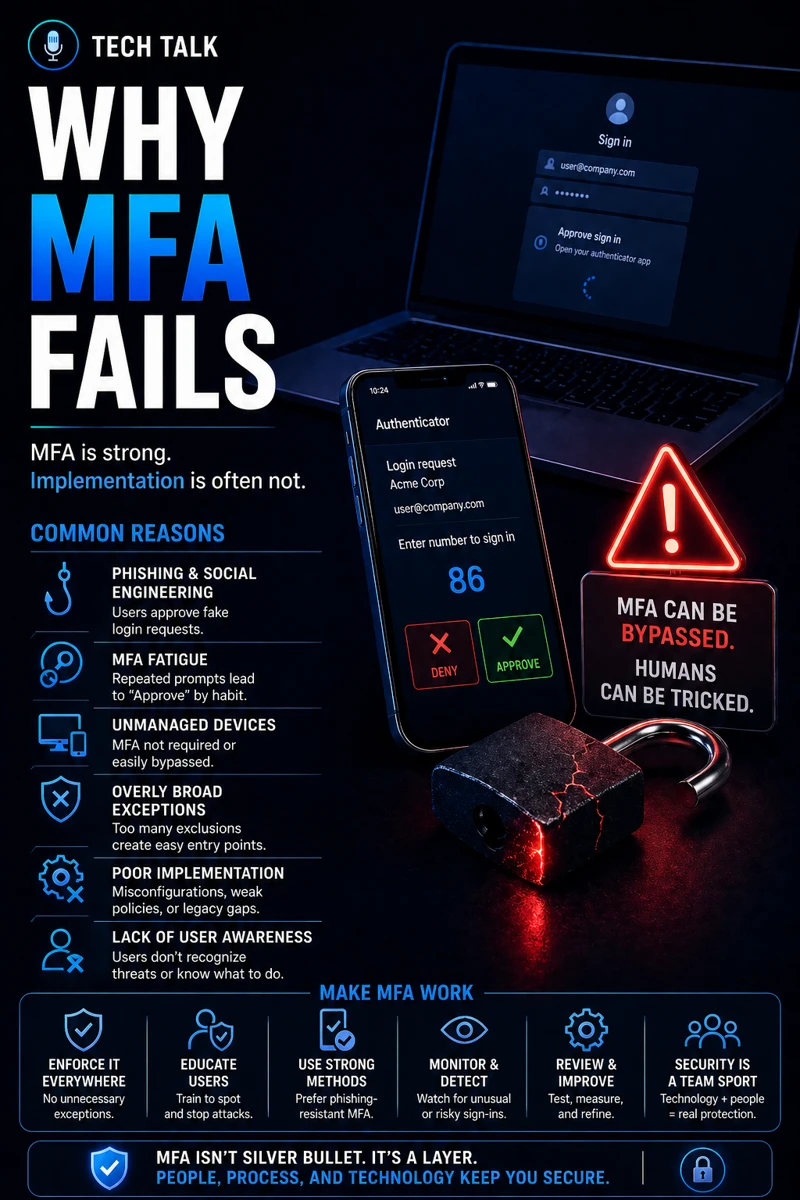
MFA failures are usually not technical.
They are behavioral or operational.
1. MFA Fatigue Attacks
Attackers:
- repeatedly send authentication requests
- pressure users to approve
Eventually, a user:
- approves the request
- grants access
This is one of the most common real-world attack methods.
2. Phishing Attacks
Attackers create:
- fake login pages
- realistic prompts
Users enter:
- credentials
- MFA codes
This leads to:
- account takeover
This aligns with phishing defense real world.
3. Session Hijacking
Attackers:
- steal session tokens
- bypass MFA entirely
This allows access without:
- reauthentication
4. SIM Swapping (SMS-Based MFA)
Attackers:
- take control of phone numbers
- receive MFA codes
This makes SMS-based MFA weaker.
5. Weak or Optional MFA Enforcement
Organizations may:
- not enforce MFA for all users
- allow exceptions
This creates:
- entry points for attackers
This aligns with microsoft 365 mfa what to require and for who.
MFA failures are often caused by people and processes — not technology.
The Hidden Risk: False Sense of Security
Many organizations believe:
- “we have MFA, so we’re safe”
This leads to:
- reduced vigilance
- overlooked risks
MFA creates risk when it leads to overconfidence.
How MFA Failures Lead to Real Incidents
MFA bypass often leads to:
- email account compromise
- financial fraud
- data exposure
This is especially common in attacks like business email compromise.
The Role of User Behavior
Users play a critical role.
Failures occur when users:
- approve unexpected prompts
- trust phishing emails
- skip verification
Training is essential to reduce this risk.
The Role of Configuration
MFA must be:
- enforced consistently
- configured correctly
- monitored
Misconfiguration leads to:
- gaps in protection
- inconsistent enforcement
The Role of Endpoint Security
Endpoints must be protected to:
- detect suspicious activity
- prevent token theft
This aligns with endpoint security basics edr vs antivirus.
The Role of Monitoring and Alerts
Organizations must monitor:
- login attempts
- unusual behavior
- MFA requests
This enables:
- early detection
- rapid response
The Role of Incident Response
If MFA is bypassed:
- response must be immediate
- accounts must be secured
This aligns with incident response plan basics.
Speed of response determines how much damage occurs after MFA bypass.
The Complexity of Identity Security
Identity security involves:
- multiple authentication methods
- user behavior
- system configuration
This creates:
- complexity
- potential vulnerabilities
What Strong MFA Protection Looks Like
A strong MFA strategy includes:
- enforced MFA for all users
- stronger authentication methods
- conditional access policies
- user training
- monitoring and alerts
It must also integrate with:
- endpoint protection
- incident response
MFA should be part of a layered identity security strategy — not the only control.
How MFA Impacts Business Operations
MFA directly affects:
- account security
- access control
- risk exposure
Weak MFA leads to:
- unauthorized access
- increased incidents
- financial loss
MFA failures often result in account compromise and financial damage.
How to Know If Your MFA Is Weak
You may have a gap if:
- MFA is optional for some users
- SMS is the primary method
- login activity is not monitored
- users are not trained
If MFA is not enforced consistently, your identity security is incomplete.
How to Strengthen MFA
Start with:
- enforcing MFA for all users
- using stronger authentication methods
- implementing conditional access
- training users on MFA risks
- monitoring login activity
These steps align with broader cybersecurity best practices.
How This Connects to Other Cybersecurity Topics
MFA connects to:
- microsoft 365 mfa what to require and for who
- phishing defense real world
- business email compromise
- incident response plan basics
- cyber insurance controls
What This Means for Your Business
Your MFA implementation determines:
- how secure user accounts are
- how easily attackers gain access
- how quickly incidents escalate
It is not optional.
It is essential.
MFA is powerful — but only when combined with strong processes and user awareness.
Final Thoughts
MFA is one of the best security controls available.
But it is not foolproof.
Understanding how it fails allows you to:
- strengthen defenses
- reduce risk
- improve security posture
Need help with this topic?
Make sure your backups actually work when it matters.
Most businesses discover backup failures during an outage. We help you validate recovery, reduce downtime risk, and build a system that works under pressure.
- Backup validation and testing
- Recovery time optimization
- Clear recovery documentation