Why Testing Your Plan Matters
Creating a business continuity plan is only the first step.
Many organizations stop there.
They assume:
- the plan is complete
- teams will follow it correctly
- systems will support it
But without testing:
- gaps remain hidden
- execution fails under pressure
- recovery is slower and less effective
If you have not tested your plan, you do not know if it works.
What It Means to Test a Business Continuity Plan
Testing a business continuity plan means:
👉 validating that your organization can execute the plan during a real disruption
It focuses on:
- real-world execution
- coordination across teams
- system and process performance
Testing answers:
👉 Can your business actually continue operating under stress?
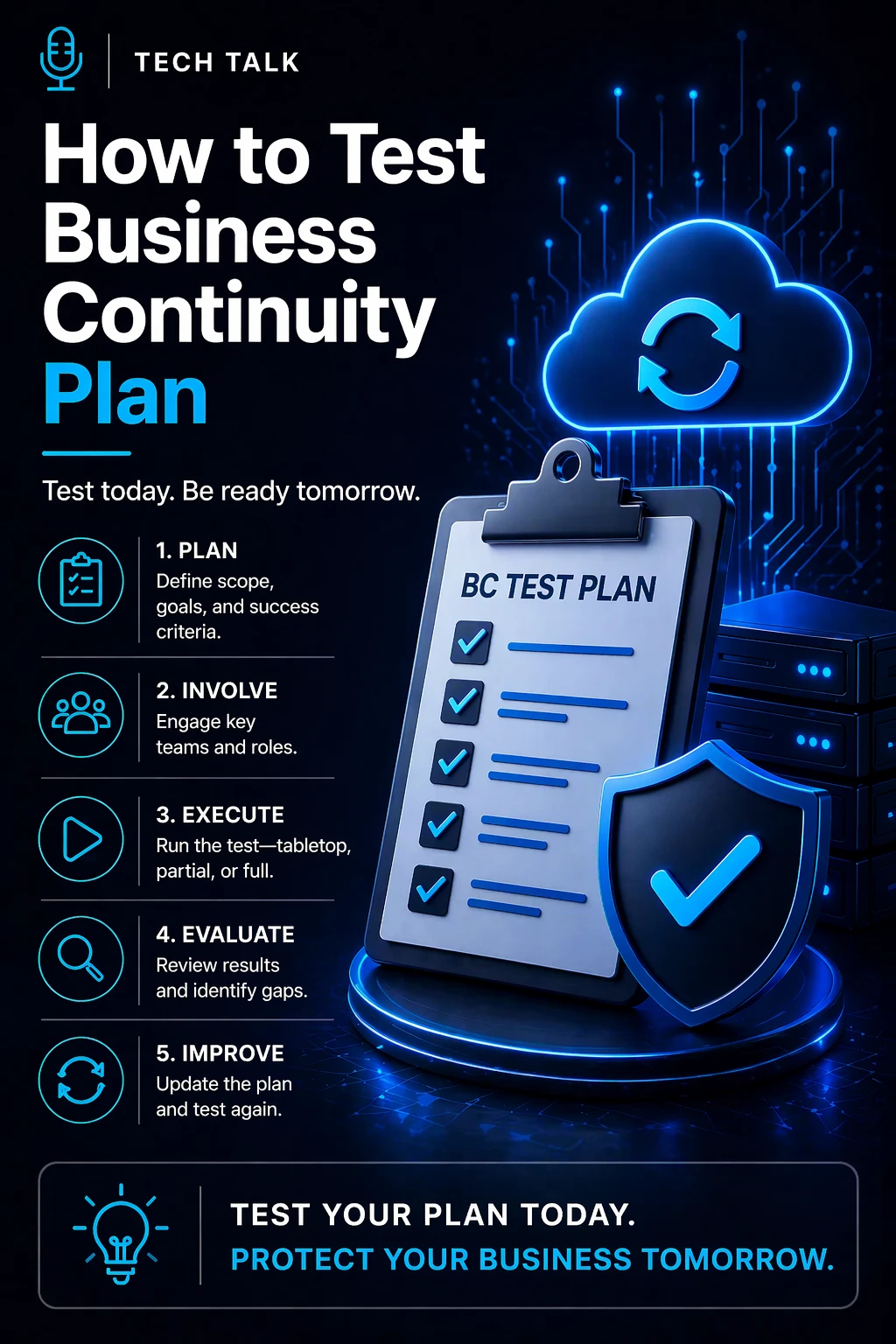
Step-by-Step: How to Test a Business Continuity Plan
Testing should follow a structured process.
Step 1: Define Clear Objectives
Start by identifying:
- what you want to test
- which systems or processes are in scope
- what success looks like
Examples:
- validate failover capability
- test communication workflows
- evaluate operational fallback processes
Without clear objectives:
👉 testing becomes unfocused and ineffective
Step 2: Identify Critical Scenarios
Design realistic scenarios based on actual risks.
Common scenarios include:
- ransomware attack
- cloud outage
- network failure
- power disruption
- vendor outage
Focus on:
👉 high-impact, high-probability events
The value of testing comes from realism — not convenience.
Step 3: Define Roles and Responsibilities
Before testing begins, ensure:
- each participant understands their role
- decision-makers are identified
- communication paths are clear
This step ensures:
👉 execution reflects real-world conditions
Step 4: Choose the Type of Test
Select the appropriate testing method:
- Tabletop exercise → discussion-based
- Simulation → active response scenario
- Technical test → system validation (failover, recovery)
- Full interruption test → real-world disruption
Each type provides different levels of validation.
Step 5: Execute the Test
Run the scenario as realistically as possible.
During execution:
- teams follow the continuity plan
- decisions are made in real time
- communication processes are used
Avoid:
- pausing the test to fix issues
- guiding participants too heavily
A test only works if it exposes problems — not if it hides them.
Step 6: Observe and Document Everything
Capture:
- what worked
- what failed
- where delays occurred
- how teams responded
Focus on:
- coordination
- timing
- clarity of decisions
This creates:
👉 a clear picture of real readiness
Step 7: Analyze Results
After the test:
- review performance against objectives
- identify gaps and weaknesses
- evaluate response effectiveness
Look for:
- breakdowns in communication
- unclear responsibilities
- system limitations
- process inefficiencies
Step 8: Improve the Plan
Testing without improvement has no value.
Use findings to:
- update procedures
- clarify roles
- improve workflows
- strengthen systems
This step ensures:
👉 continuous improvement
Step 9: Retest Regularly
Continuity testing is not a one-time activity.
Plans must be tested:
- regularly (at least annually)
- after major system changes
- after organizational changes
- after incidents
Every test should make your continuity plan stronger than before.
What to Look for During Testing
During execution, evaluate:
- how quickly teams respond
- how clearly roles are understood
- how effectively communication flows
- how well systems support operations
- how smoothly fallback processes work
These indicators reveal:
👉 true operational readiness
Common Testing Mistakes to Avoid
Organizations often:
- test only once or infrequently
- use unrealistic scenarios
- avoid testing critical systems
- fail to involve key stakeholders
- ignore test results
These mistakes lead to:
- false confidence
- incomplete validation
- repeated failures
Testing for compliance instead of realism results in plans that fail in real incidents.
What a Successful Test Looks Like
A successful test is not one where everything works.
It is one where:
- weaknesses are identified
- teams learn from mistakes
- improvements are implemented
Success means:
👉 your organization is better prepared after the test than before it
How to Know If Your Plan Is Ready
Your continuity plan is likely ready if:
- it has been tested under realistic conditions
- teams can execute without confusion
- systems support continuity processes
- improvements have been implemented
If not:
👉 your plan is still incomplete
If your plan has not been tested thoroughly, you should assume it will not perform as expected.
What This Means for Your Business
Testing determines:
- how effectively your business responds to disruption
- how quickly operations stabilize
- how well teams coordinate under pressure
- how resilient your organization truly is
Testing transforms a continuity plan from a document into a proven capability.
Final Thoughts
A business continuity plan is only valuable if it works.
Testing ensures:
- readiness
- reliability
- confidence
Without testing:
- plans fail
- disruption increases
Need help with this topic?
Make sure your backups actually work when it matters.
Most businesses discover backup failures during an outage. We help you validate recovery, reduce downtime risk, and build a system that works under pressure.
- Backup validation and testing
- Recovery time optimization
- Clear recovery documentation