What WiFi Reliability Really Means
WiFi reliability is not just about speed.
It is about:
- consistent connectivity
- stable performance
- predictable behavior
Unreliable WiFi leads to:
- dropped connections
- slow applications
- frustrated users
Most WiFi problems are caused by design issues — not internet speed.
Why WiFi Reliability Matters for Business
WiFi supports:
- cloud applications
- communication tools
- daily operations
When it fails:
- productivity drops
- systems become inaccessible
- users lose trust
This becomes especially important in environments using solutions like sd-wan vs vpn.
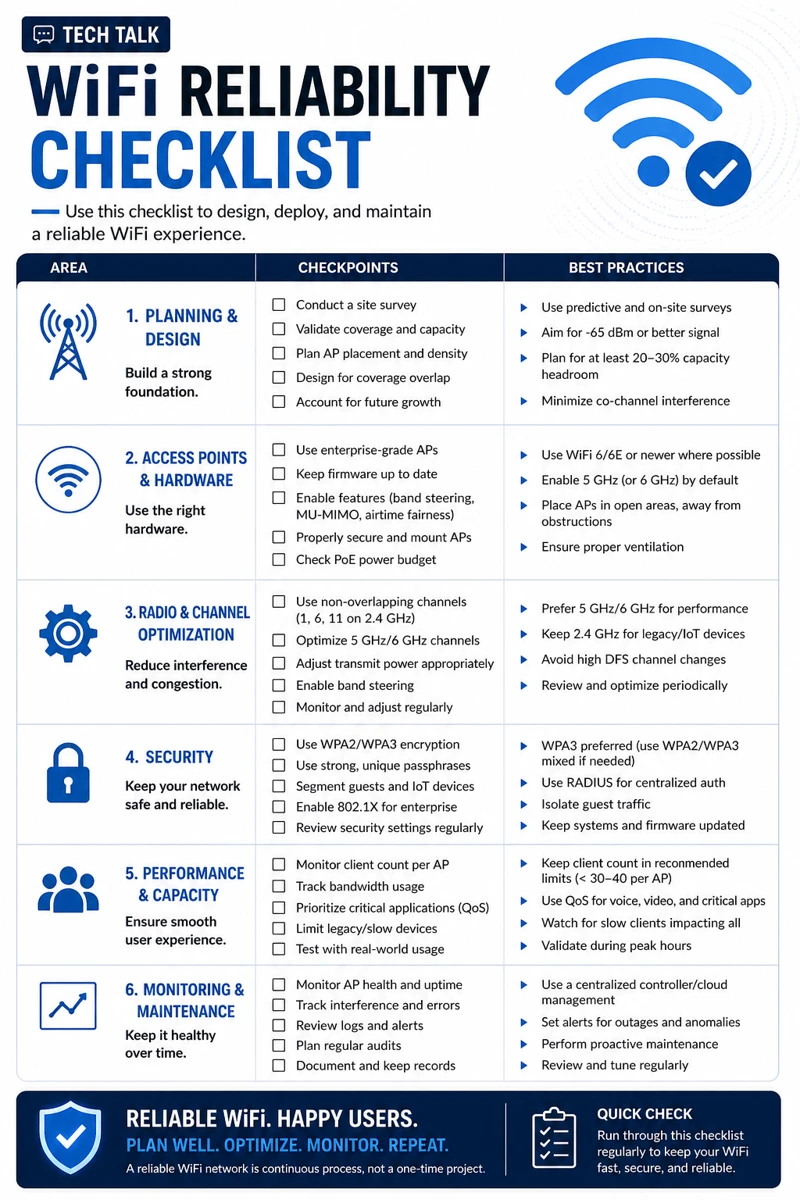
The WiFi Reliability Checklist
Use this checklist to identify issues and improve performance.
1. Coverage and Signal Strength
Check:
- are there dead zones?
- is signal consistent across the office?
- are access points placed correctly?
Poor coverage leads to:
- dropped connections
- inconsistent performance
2. Access Point Placement
Ensure:
- access points are evenly distributed
- not blocked by walls or obstacles
- not clustered in one area
Poor placement creates:
- uneven coverage
- interference
3. Network Segmentation
Check:
- are guest and internal networks separated?
- are sensitive systems isolated?
This improves:
- security
- performance
This aligns with network segmentation basics.
4. Device Capacity and Load
Evaluate:
- number of connected devices
- bandwidth usage
Overloaded networks cause:
- slow speeds
- dropped connections
5. Interference and Channel Management
Check for:
- overlapping channels
- interference from other networks
Proper configuration reduces:
- signal disruption
- performance issues
6. Security Configuration
Ensure:
- strong WiFi encryption (WPA2/WPA3)
- secure passwords
- restricted access
This helps prevent:
- unauthorized access
- network abuse
This aligns with cyber insurance controls.
Weak WiFi security allows unauthorized users to access your network.
7. Firmware and Updates
Check:
- are access points updated?
- is firmware current?
Outdated systems create:
- vulnerabilities
- instability
This aligns with patch management smb.
8. Endpoint Performance
Ensure devices:
- have updated drivers
- are not overloaded
- are functioning properly
This aligns with endpoint security basics edr vs antivirus.
9. Monitoring and Visibility
Check:
- can you see network performance?
- are issues logged and tracked?
Without visibility:
- problems go unnoticed
- troubleshooting is reactive
10. Backup and Redundancy
Consider:
- failover internet connections
- backup access points
This improves:
- reliability
- uptime
This aligns with ransomware readiness 60-minute executive checklist.
Reliable WiFi depends on design, security, and ongoing management.
The Hidden Risk: Assuming WiFi “Just Works”
Many businesses:
- install WiFi once
- never review it
This leads to:
- outdated configurations
- growing performance issues
WiFi environments degrade over time without maintenance.
The Role of WiFi in Security
WiFi is part of your security perimeter.
Weak WiFi can lead to:
- unauthorized access
- network intrusion
This connects to:
The Complexity of Wireless Networks
Modern WiFi environments include:
- many devices
- cloud applications
- mobile users
This creates:
- complexity
- performance challenges
What a Reliable WiFi Network Looks Like
A strong WiFi environment includes:
- proper coverage
- balanced load
- secure configuration
- continuous monitoring
It must also align with:
- network architecture
- business needs
WiFi should be reviewed regularly — not just when problems occur.
How WiFi Reliability Impacts Business Operations
WiFi affects:
- productivity
- application performance
- user experience
Poor WiFi leads to:
- inefficiency
- frustration
- lost time
Unreliable WiFi directly impacts employee productivity.
How to Know If Your WiFi Needs Improvement
You may have a gap if:
- connections drop frequently
- speeds are inconsistent
- users complain regularly
- issues are difficult to diagnose
If WiFi problems are common, your network design likely needs improvement.
How to Improve WiFi Reliability
Start with:
- assessing coverage
- optimizing placement
- securing access
- monitoring performance
These steps align with broader network and security practices.
How This Connects to Other Cybersecurity Topics
WiFi reliability connects to:
- sd-wan vs vpn
- network segmentation basics
- patch management smb
- endpoint security basics edr vs antivirus
- incident response plan basics
What This Means for Your Business
Your WiFi reliability determines:
- how efficiently your team works
- how stable your systems are
- how secure your network is
It is not optional.
It is essential.
Reliable WiFi is the foundation of modern business operations.
Final Thoughts
WiFi is often overlooked.
But it is critical.
When designed and managed correctly:
- performance improves
- security strengthens
- operations run smoothly
Need help with this topic?
Make sure your backups actually work when it matters.
Most businesses discover backup failures during an outage. We help you validate recovery, reduce downtime risk, and build a system that works under pressure.
- Backup validation and testing
- Recovery time optimization
- Clear recovery documentation