Why Cloud Migration Planning Matters
Moving to the cloud is often seen as a simple upgrade.
But in reality:
👉 Cloud migration is one of the highest-risk changes you can make to your IT environment
It affects:
- applications
- data
- users
- security
- performance
- business operations
Without proper planning:
- systems may fail
- data may be lost
- downtime may occur
- users may be impacted
Most cloud migration problems are not caused by the cloud—they are caused by poor planning before the move.
What Is Cloud Migration?
Cloud migration is the process of:
👉 moving systems, data, and workloads from on-premise environments to the cloud
This can include:
- servers
- applications
- databases
- file storage
- email systems
- business platforms
Cloud migration is not just a technical task.
It is a:
👉 business operation change
Types of Cloud Migration
There are several approaches to cloud migration.
1. Lift and Shift
- move systems as-is to the cloud
- minimal changes
Pros:
- fast
- simple
Cons:
- may not improve performance
- may increase costs
2. Replatforming
- make small optimizations during migration
- improve performance without full redesign
3. Refactoring
- redesign applications for cloud-native environments
- maximize scalability and efficiency
Pros:
- best long-term performance
- better scalability
Cons:
- more complex
- requires planning and development
Why Cloud Migrations Fail
Common reasons include:
- lack of planning
- unclear system dependencies
- poor data mapping
- inadequate testing
- unrealistic timelines
- ignoring user impact
- missing rollback plans
These issues lead to:
- downtime
- broken systems
- lost productivity
- frustrated users
Rushed migrations often create more problems than they solve.
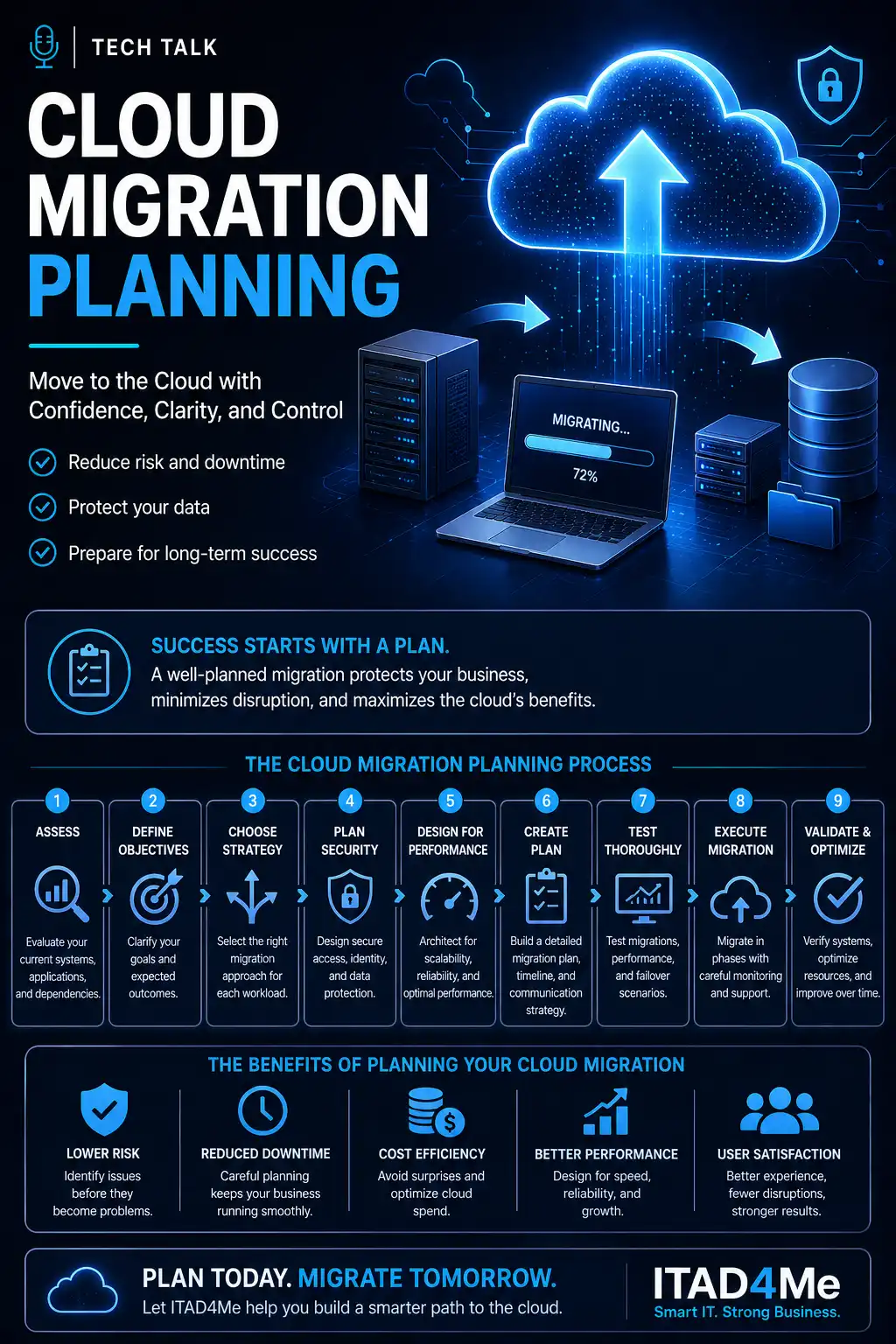
The Cloud Migration Planning Process
A successful migration follows a structured process.
Step 1: Assess Your Current Environment
Before moving anything, you must understand:
- what systems you have
- how they interact
- what dependencies exist
- what workloads are critical
Without this:
👉 you are migrating blind
Step 2: Define Business Objectives
Ask:
- Why are we moving to the cloud?
- What problem are we solving?
- What outcomes do we expect?
Common goals include:
- scalability
- remote access
- cost control
- improved performance
Step 3: Choose the Right Migration Strategy
Not all systems should be migrated the same way.
Some may need:
- lift and shift
- optimization
- full redesign
Step 4: Plan Security and Access
Cloud environments introduce new risks.
You must plan:
- identity and access control
- user permissions
- data protection
- network security
Related reading:
Step 5: Design for Performance and Scaling
Cloud systems must be built to handle demand.
This includes:
- load balancing
- auto scaling
- resource allocation
- database performance
Related reading:
Step 6: Create a Migration Plan and Timeline
Your plan should include:
- migration phases
- system priorities
- timelines
- responsibilities
- communication plan
Step 7: Test Before Full Deployment
Testing is critical.
This may include:
- test migrations
- user testing
- performance testing
- failover testing
Related reading:
Step 8: Execute the Migration
Execution should be:
- controlled
- monitored
- staged when possible
Avoid:
👉 big-bang migrations without fallback options
Step 9: Validate and Optimize
After migration:
- verify systems
- monitor performance
- optimize resources
- resolve issues
Migration is not finished until:
👉 systems are stable and performing correctly
The Importance of Downtime Planning
Even well-planned migrations can involve downtime.
You must plan:
- when downtime occurs
- how long it lasts
- how users are notified
- how operations continue
Related reading:
Data Protection During Migration
Data is one of the most critical assets.
You must ensure:
- backups exist before migration
- data is verified after migration
- no data is lost or corrupted
Related reading:
Common Cloud Migration Mistakes
Avoid these:
- skipping assessment
- underestimating dependencies
- ignoring security configuration
- failing to test
- migrating everything at once
- not training users
- assuming cloud fixes performance automatically
These mistakes create:
- outages
- performance issues
- security gaps
- higher costs
How Cloud Migration Impacts Business Continuity
Migration affects:
- uptime
- operations
- user productivity
Without planning:
- disruption increases
- recovery becomes harder
With planning:
- systems remain stable
- downtime is minimized
- operations continue
Signs Your Migration Needs Better Planning
Warning signs include:
- unclear system inventory
- no defined migration strategy
- lack of testing plan
- missing rollback procedures
- no user communication plan
- unrealistic timelines
If you cannot clearly explain how your migration will work step-by-step, it is not fully planned.
What This Means for Your Business
Cloud migration is not just a technical upgrade.
It is a:
👉 business-critical transformation
When done correctly:
- systems improve
- performance increases
- flexibility grows
When done poorly:
- disruptions occur
- costs increase
- trust is lost
Planning determines whether cloud migration becomes a success or a setback.
Final Thoughts
The cloud offers powerful advantages.
But those advantages only appear when migration is done correctly.
Successful migrations require:
- preparation
- strategy
- testing
- validation
Not just execution.
Next Step
If your organization is planning a cloud migration—or has already experienced issues—it may be time to take a structured approach.
Start by reviewing:
- your current environment
- your migration goals
- your system dependencies
- your testing and rollback plans
Need help with this topic?
Make sure your backups actually work when it matters.
Most businesses discover backup failures during an outage. We help you validate recovery, reduce downtime risk, and build a system that works under pressure.
- Backup validation and testing
- Recovery time optimization
- Clear recovery documentation