Why Single Points of Failure Matter
Many disruptions are not caused by complex failures.
They are caused by:
👉 one thing breaking — and nothing backing it up
This is a single point of failure.
When it fails:
- operations stop
- access is lost
- recovery becomes urgent
The simplest failure can have the largest impact when no redundancy exists.
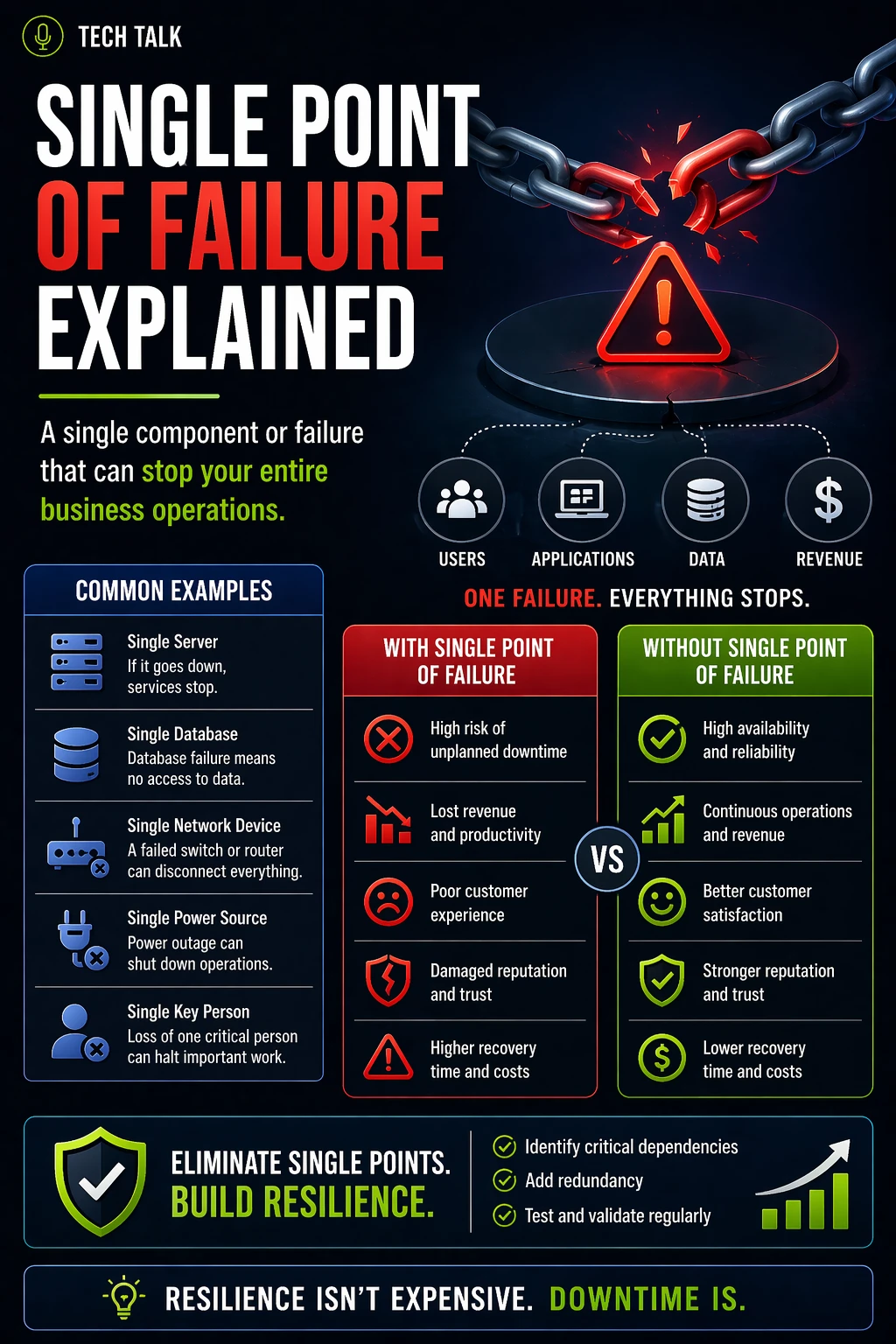
What Is a Single Point of Failure (SPOF)?
A single point of failure is:
👉 any component that, if it fails, will stop an entire system or process
This can include:
- a server
- a network connection
- a key employee
- a critical vendor
- a manual process
If that component fails:
- there is no fallback
- there is no redundancy
- there is no continuity
Where SPOFs Exist (More Than You Think)
Single points of failure are not limited to technology.
They exist across the business.
Technology SPOFs
- a single server hosting critical applications
- one internet connection
- centralized storage without replication
Process SPOFs
- manual workflows with no alternatives
- undocumented procedures
- reliance on a single system
People SPOFs
- one employee with critical knowledge
- no cross-training
- no delegation or backup roles
Vendor SPOFs
- reliance on a single supplier
- no alternative providers
- external dependencies with no contingency
Most businesses have multiple single points of failure — they are just not visible until something breaks.
What Happens When a SPOF Fails
A typical scenario:
- a critical system fails
- no backup system exists
- operations cannot continue
At that point:
- downtime begins immediately
- productivity drops
- customer impact increases
Without redundancy:
- recovery becomes urgent
- pressure increases
- risk escalates
Why SPOFs Are So Dangerous
Single points of failure are dangerous because they:
- create hidden risk
- are often overlooked
- fail without warning
They also:
- amplify impact
- reduce response options
- increase downtime
A single point of failure turns a minor issue into a major disruption.
How SPOFs Impact Business Continuity
Business continuity depends on:
- redundancy
- flexibility
- alternative processes
SPOFs remove all three.
When a SPOF exists:
- continuity strategies fail
- operations cannot continue
- recovery becomes the only option
See:
Why Many SPOFs Go Undetected
Common reasons include:
- lack of visibility into dependencies
- incomplete planning
- assumptions about system reliability
- no formal risk assessment
See
risk assessment
You often discover a single point of failure only after it has already caused disruption.
How to Identify Single Points of Failure
To identify SPOFs, ask:
- what happens if this fails?
- is there a backup or alternative?
- can operations continue without it?
Look for:
- systems without redundancy
- processes without alternatives
- roles without backups
This process should be part of:
- business impact analysis
- risk assessment
- continuity planning
How to Eliminate SPOFs
Removing single points of failure requires:
Redundancy
- multiple systems
- backup infrastructure
- alternative vendors
Process Design
- documented procedures
- fallback workflows
- manual alternatives
Cross-Training
- shared knowledge
- backup personnel
- defined responsibilities
Technology Alignment
- failover systems
- cloud and hybrid solutions
- distributed infrastructure
Eliminating SPOFs is not about adding complexity — it is about removing critical dependency on any single component.
Common Mistakes to Avoid
Avoid these pitfalls:
- assuming systems will not fail
- relying on a single vendor
- failing to document processes
- not testing redundancy
- ignoring human dependencies
These create:
- hidden vulnerabilities
- increased disruption risk
How to Know If You Have SPOFs
Warning signs include:
- operations stop when one system fails
- only one person can perform critical tasks
- no backup systems or processes exist
- recovery is the only response
If one failure can stop your business, you have a single point of failure.
What This Means for Your Business
Single points of failure determine:
- how fragile your operations are
- how quickly disruption escalates
- how difficult recovery becomes
Resilience is not about preventing failure — it is about ensuring no single failure can stop your business.
Final Thoughts
Every business has risks.
But not every business has single points of failure.
Those that do:
- are more vulnerable
- experience greater disruption
- recover more slowly
The goal is simple:
👉 no single failure should stop your business
Need help with this topic?
Make sure your backups actually work when it matters.
Most businesses discover backup failures during an outage. We help you validate recovery, reduce downtime risk, and build a system that works under pressure.
- Backup validation and testing
- Recovery time optimization
- Clear recovery documentation