Why a Business Continuity Plan Exists
Every business depends on:
- systems
- people
- processes
When any of these fail:
- operations are disrupted
- productivity declines
- impact escalates quickly
A business continuity plan (BCP) exists to answer one critical question:
👉 How does the business continue to operate when normal conditions are no longer possible?
Without a defined plan, businesses are forced to react — and reaction is rarely effective under pressure.
What Is a Business Continuity Plan (BCP)?
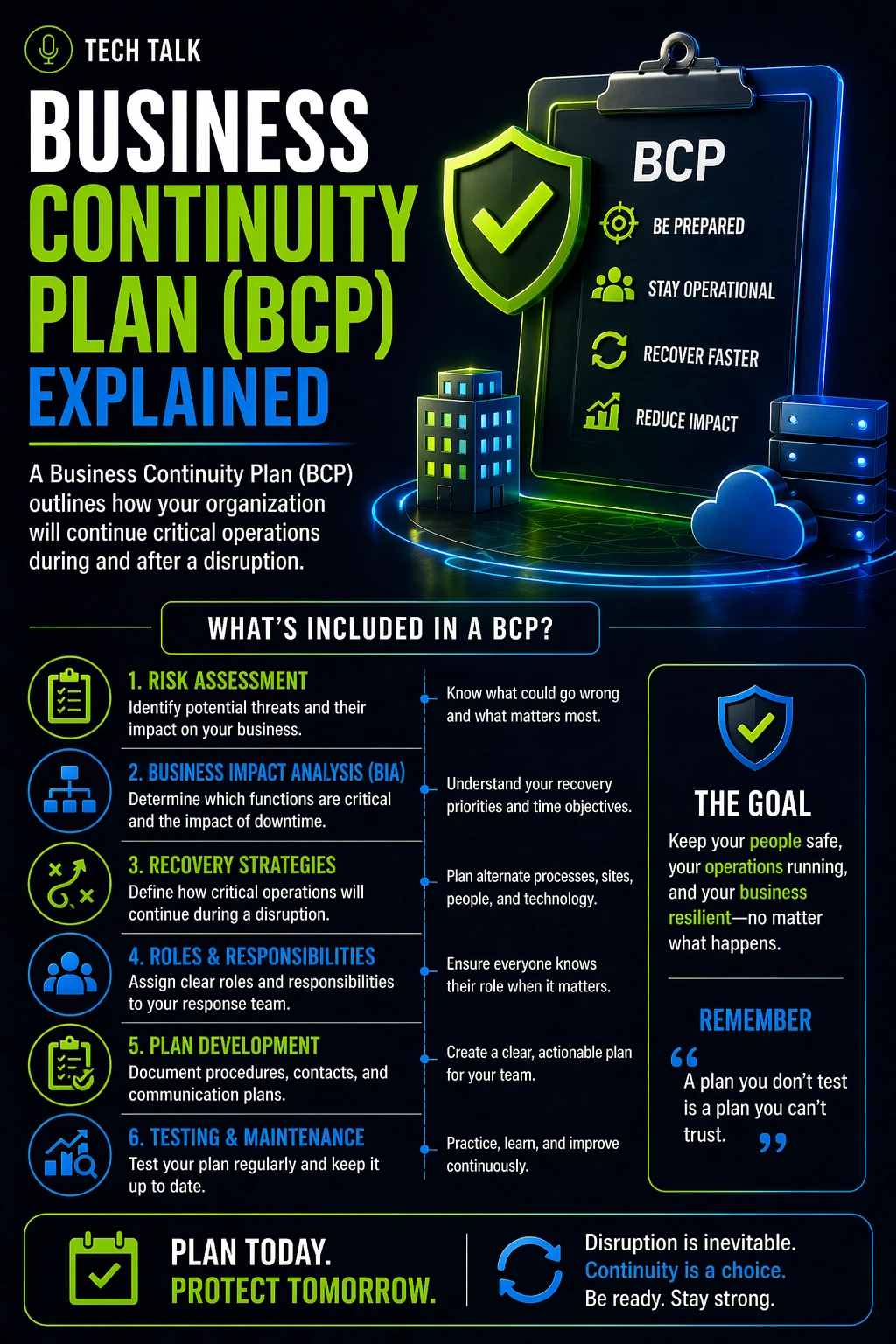
A business continuity plan is a structured framework that defines:
👉 how your organization maintains critical operations during and after disruption
It is not just an IT document.
It includes:
- operational processes
- employee responsibilities
- communication strategies
- technology alignment
A BCP ensures:
- critical functions continue
- teams know what to do
- disruption impact is minimized
What a BCP Is Not
A business continuity plan is often misunderstood.
It is not:
- just a backup strategy
- just a disaster recovery plan
- a document that sits unused
A BCP is not about restoring systems — it is about operating without them.
What Happens Without a BCP
A typical scenario without a plan:
- disruption occurs
- employees lose access to systems
- leadership must make decisions in real time
- communication breaks down
- processes stop
At that point:
- response is inconsistent
- confusion increases
- downtime extends
Even with recovery:
- lost productivity cannot be recovered
- customer impact has already occurred
The Core Components of a Business Continuity Plan
A complete BCP includes multiple interconnected components.
1. Business Impact Analysis (BIA)
- identifies critical operations
- determines acceptable downtime
- prioritizes business functions
2. Risk Assessment
- identifies potential threats
- evaluates likelihood and impact
- prepares for realistic disruption scenarios
See
risk assessment
3. Continuity Strategies
- defines how operations continue
- includes alternative workflows
- outlines manual or fallback processes
4. Roles and Responsibilities
- defines decision-makers
- assigns responsibilities during disruption
- ensures accountability
5. Communication Plan
- internal communication procedures
- customer communication strategy
- escalation paths
6. Technology and Infrastructure
- backup and recovery systems
- redundant infrastructure
- cloud and hybrid solutions
See
backup and recovery resilience
7. Recovery Integration
- alignment with disaster recovery
- coordination with backup systems
- transition back to normal operations
8. Testing and Validation
- validates plan effectiveness
- identifies gaps and weaknesses
- ensures readiness
See
business continuity testing
How a BCP Works in a Real Incident
A simplified timeline:
-
Disruption Occurs
- systems fail or become unavailable
-
BCP Activates
- continuity procedures begin
- fallback processes are used
-
Operations Continue
- critical functions remain active
- service delivery is maintained
-
Recovery Happens in Parallel
- systems are restored
- data is recovered
-
Return to Normal
- continuity processes phase out
- standard operations resume
A BCP ensures your business keeps running while recovery happens in the background.
Why Most BCPs Fail
Many organizations have a plan — but it does not work.
Common reasons include:
- plans are outdated
- procedures are unclear
- roles are not defined
- testing has not been performed
- assumptions replace validation
A BCP that has not been tested under real conditions is not reliable.
What a Strong BCP Looks Like
An effective business continuity plan is:
- clear and actionable
- aligned with real-world risks
- understood by the organization
- regularly tested and updated
- integrated with recovery systems
It should be:
- practical
- executable under pressure
- designed for real scenarios
How to Know If You Have a BCP Gap
You may lack an effective BCP if:
- operations stop during outages
- employees are unsure what to do
- processes are undocumented
- recovery is your only strategy
- testing has never been performed
If your organization cannot operate during disruption, your BCP is incomplete or ineffective.
What This Means for Your Business
A business continuity plan determines:
- how your organization responds to disruption
- how well operations continue
- how customers experience outages
- how much impact is sustained
A BCP does not prevent disruption — it determines how your business survives it.
Final Thoughts
Having a plan is not enough.
It must work.
A business continuity plan is only valuable if:
- it is understood
- it is tested
- it can be executed under pressure
Need help with this topic?
Make sure your backups actually work when it matters.
Most businesses discover backup failures during an outage. We help you validate recovery, reduce downtime risk, and build a system that works under pressure.
- Backup validation and testing
- Recovery time optimization
- Clear recovery documentation