Why Building a Business Continuity Plan Matters
Disruption will happen.
The only variable is how prepared your business is when it does.
Without a plan:
- response is reactive
- decisions are delayed
- operations stop
With a plan:
- response is structured
- roles are clear
- operations continue
A business continuity plan is not about avoiding disruption — it is about controlling what happens when it occurs.
What You Are Actually Building
When you build a business continuity plan (BCP), you are creating:
👉 a system that allows your business to operate under disruption
This system includes:
- critical operations
- fallback processes
- defined responsibilities
- communication workflows
- supporting technology
It is not just documentation.
It is execution under pressure.
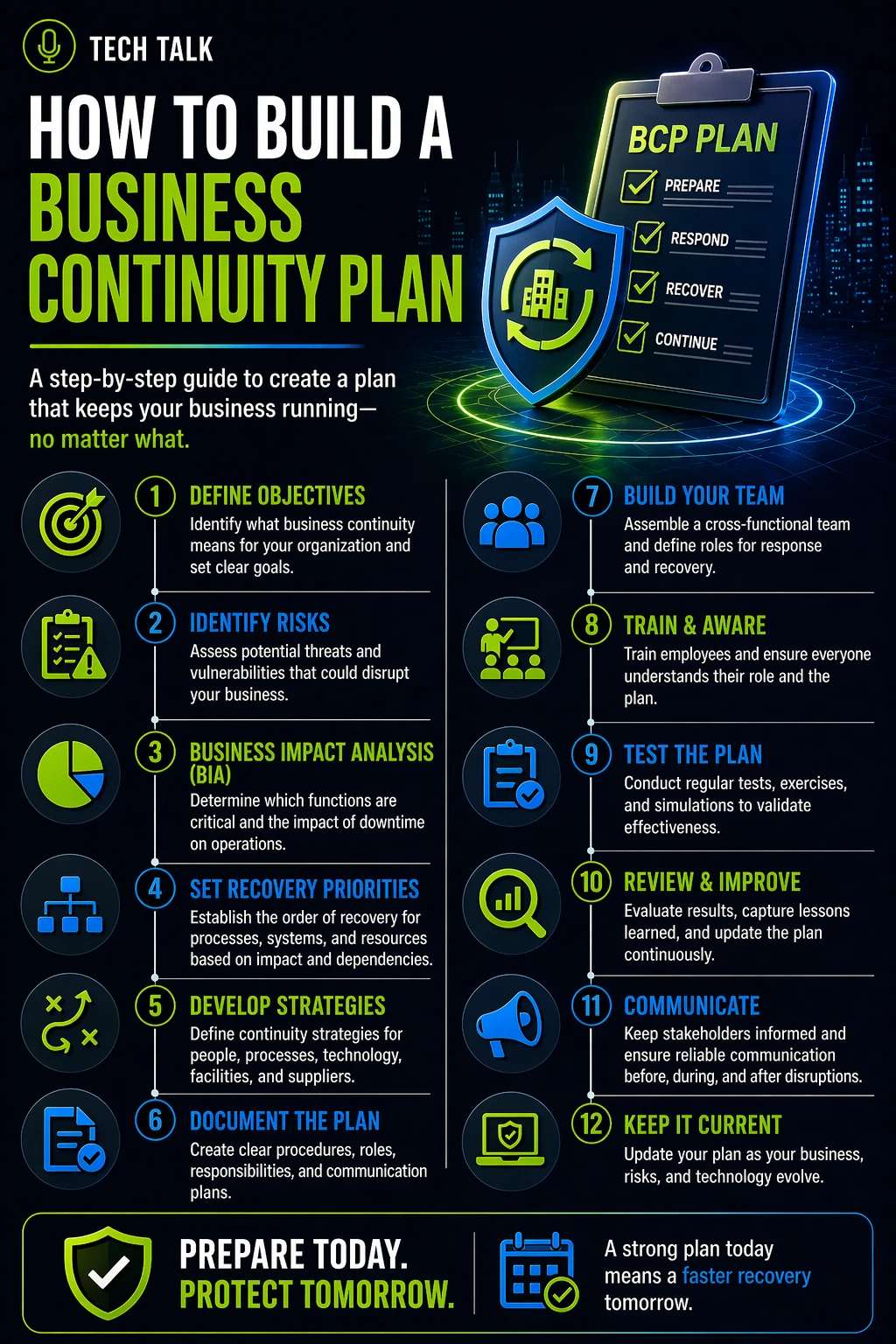
Step 1: Identify Critical Business Functions
Start by understanding what must continue.
Ask:
- what operations are essential?
- what processes cannot stop?
- what directly impacts revenue or customers?
Focus on:
- customer-facing services
- core operational workflows
- financial processes
This forms the foundation of your plan.
Step 2: Understand Dependencies
Every critical function depends on something.
Identify:
- systems and applications
- employees and roles
- vendors and third parties
- infrastructure and connectivity
Without this step:
- plans will fail due to overlooked dependencies
Continuity plans fail most often because dependencies are not fully understood.
Step 3: Assess Risks and Scenarios
Identify realistic threats:
- ransomware
- system outages
- cloud failures
- human error
- natural disruptions
For each risk, ask:
- what fails?
- what is impacted?
- how long could it last?
See
risk assessment
Step 4: Define Continuity Strategies
Determine how operations will continue.
This may include:
- manual processes
- alternative systems
- remote work strategies
- temporary workflows
The goal:
👉 keep the business functioning — even at reduced capacity
Avoid:
- relying on immediate recovery
- assuming systems will be available
Step 5: Define Roles and Responsibilities
During disruption, clarity matters.
Define:
- who makes decisions
- who executes processes
- who communicates with stakeholders
Without defined roles:
- confusion slows response
- decisions are delayed
Step 6: Build a Communication Plan
Communication is critical during disruption.
Define:
- internal communication methods
- customer communication strategies
- escalation procedures
Ensure:
- communication works even if primary systems fail
Step 7: Align Technology and Recovery
Continuity depends on technology.
Ensure alignment with:
- backup and recovery systems
- redundant infrastructure
- cloud and hybrid environments
See
backup and recovery resilience
Also understand:
- recovery supports continuity
- but does not replace it
Step 8: Document the Plan Clearly
Your plan must be:
- simple
- structured
- actionable
Avoid:
- overly complex documentation
- theoretical language
Focus on:
👉 what people actually do during disruption
Step 9: Test the Plan
Testing is where most plans fail.
Conduct:
- tabletop exercises
- simulated disruptions
- recovery validations
Test for:
- execution speed
- clarity of roles
- process effectiveness
See
business continuity testing
An untested plan is an assumption — not a strategy.
Step 10: Maintain and Improve
Continuity planning is ongoing.
Update your plan when:
- systems change
- processes evolve
- risks increase
Regularly:
- review
- test
- refine
What a Complete Plan Looks Like
A strong business continuity plan includes:
- clearly defined critical functions
- documented fallback processes
- defined roles and responsibilities
- communication strategies
- aligned technology and recovery systems
- regular testing and updates
The strength of a continuity plan is measured by how well it works under pressure — not how well it reads on paper.
Common Mistakes to Avoid
Avoid these pitfalls:
- focusing only on IT systems
- ignoring operational processes
- assuming recovery will be immediate
- failing to test the plan
- overcomplicating documentation
These lead to:
- slower response
- operational disruption
- increased impact
How to Know If Your Plan Is Effective
Your plan is strong if:
- operations can continue during disruption
- employees know their roles
- communication is clear
- testing has validated execution
If not:
- your plan is incomplete
If your business cannot operate during disruption, your continuity plan is not yet effective.
What This Means for Your Business
Building a business continuity plan determines:
- how prepared your organization is
- how quickly you respond
- how well operations continue
- how much impact disruption causes
A continuity plan does not eliminate disruption — it determines how your business handles it.
Final Thoughts
You do not build a continuity plan for normal conditions.
You build it for failure.
The goal is simple:
👉 keep the business running — no matter what happens
Need help with this topic?
Make sure your backups actually work when it matters.
Most businesses discover backup failures during an outage. We help you validate recovery, reduce downtime risk, and build a system that works under pressure.
- Backup validation and testing
- Recovery time optimization
- Clear recovery documentation