Why Redundancy Matters
Every system will fail at some point.
The question is:
👉 What happens when it does?
Without redundancy:
- operations stop
- systems become unavailable
- recovery becomes urgent
With redundancy:
- systems fail — but operations continue
Failure is inevitable — downtime is optional when redundancy exists.
What Is Redundancy?
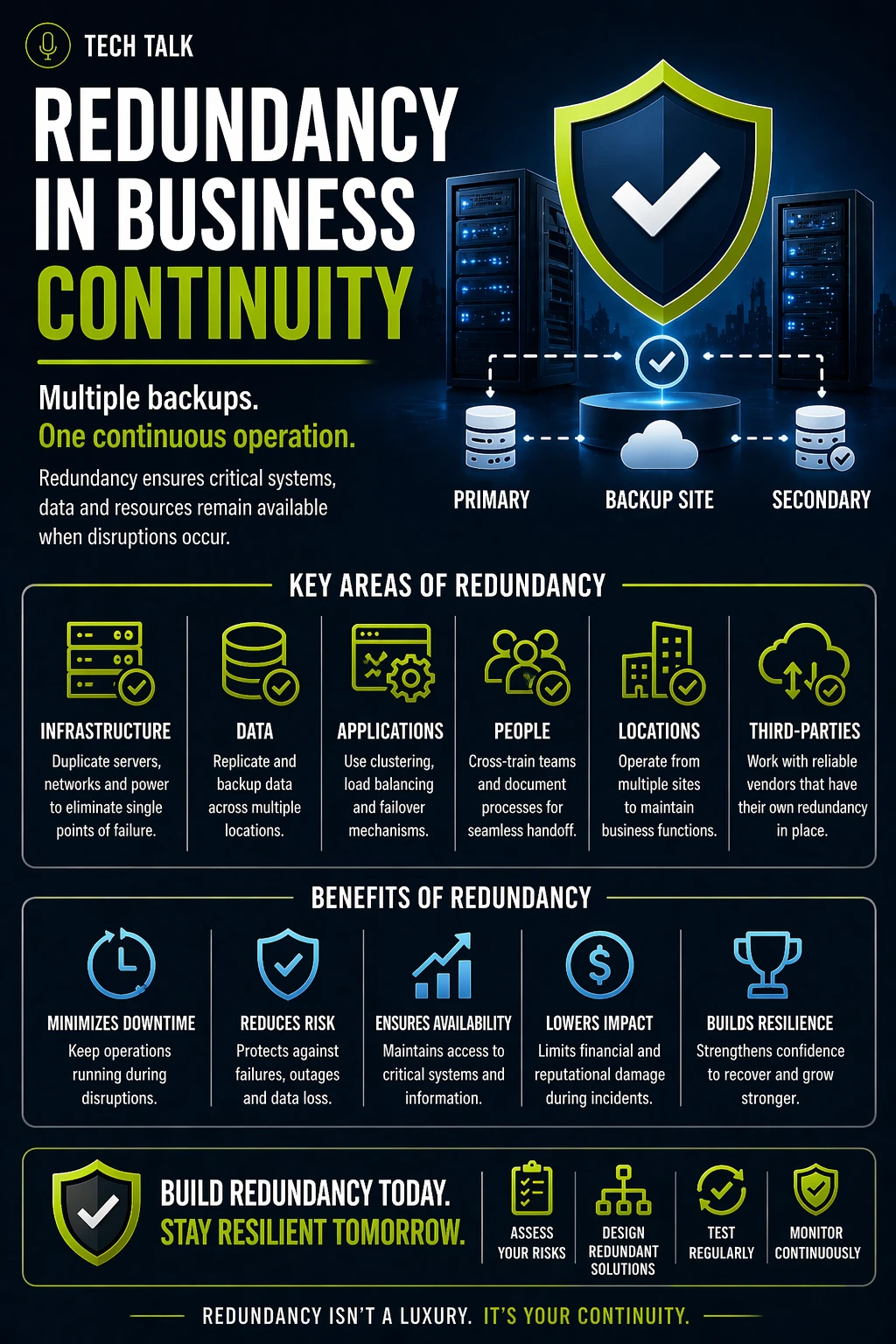
Redundancy is the practice of:
👉 duplicating critical components so that failure does not stop operations
It ensures:
- no single failure disrupts the business
- systems continue functioning during issues
- continuity strategies can execute
Redundancy vs Backup (Critical Difference)
Redundancy and backup are often confused.
They solve different problems.
Redundancy
- Keeps systems running during failure
- Provides real-time availability
- Prevents downtime
Backup
- Restores data after failure
- Focuses on recovery
- Does not prevent downtime
Backups help you recover — redundancy helps you avoid stopping.
Types of Redundancy in Business Continuity
Redundancy can be applied across multiple layers.
1. Infrastructure Redundancy
- multiple servers
- redundant storage systems
- failover environments
Ensures:
- systems remain available
2. Network Redundancy
- multiple internet connections
- redundant routing paths
- failover connectivity
Ensures:
- continued access to systems
3. Data Redundancy
- replicated data across locations
- multiple storage environments
Supports:
- availability and recovery
See
backup and recovery resilience
4. Application Redundancy
- multiple instances of applications
- load balancing
Ensures:
- services remain accessible
5. Operational Redundancy
- cross-trained employees
- documented processes
- backup roles
Ensures:
- work continues even if individuals are unavailable
Redundancy is not just technical — it includes people and processes.
How Redundancy Supports Business Continuity
Redundancy enables:
- uninterrupted operations
- reduced downtime
- faster recovery
Without redundancy:
- continuity plans rely on recovery
- operations stop during failure
See
business continuity failures
What Happens Without Redundancy
A typical scenario:
- a critical system fails
- no backup system exists
- operations stop
At that point:
- downtime begins immediately
- impact escalates
- recovery becomes urgent
Without redundancy, one failure can stop your entire business.
Why Redundancy Is Often Missing
Common reasons include:
- cost concerns
- complexity
- lack of awareness
- assumption that failure is unlikely
These lead to:
- hidden vulnerabilities
- increased disruption risk
Designing Effective Redundancy
Effective redundancy requires:
- identifying critical systems
- understanding dependencies
- implementing duplication where needed
Ask:
- what happens if this fails?
- is there an alternative?
- can operations continue?
See:
Common Redundancy Mistakes
Avoid these pitfalls:
- relying on a single backup system
- implementing redundancy without testing
- ignoring network dependencies
- failing to consider operational redundancy
These create:
- false confidence
- ineffective continuity
Redundancy vs High Availability
Redundancy supports high availability.
High availability ensures:
- systems remain accessible
- failover happens automatically
Redundancy provides:
- the components required for availability
How to Know If You Lack Redundancy
Warning signs include:
- outages cause full system failure
- no failover systems exist
- operations stop during disruption
- recovery is the only response
If one failure can stop your operations, redundancy is missing.
What This Means for Your Business
Redundancy determines:
- how resilient your systems are
- how disruption impacts operations
- how quickly your business recovers
Resilience is built by ensuring no single failure can stop your business.
Final Thoughts
Redundancy is not optional for continuity.
It is foundational.
Without it:
- failure leads to downtime
With it:
- failure becomes manageable
Need help with this topic?
Make sure your backups actually work when it matters.
Most businesses discover backup failures during an outage. We help you validate recovery, reduce downtime risk, and build a system that works under pressure.
- Backup validation and testing
- Recovery time optimization
- Clear recovery documentation