What Cloud Infrastructure Components Really Are
Cloud infrastructure is not a single system.
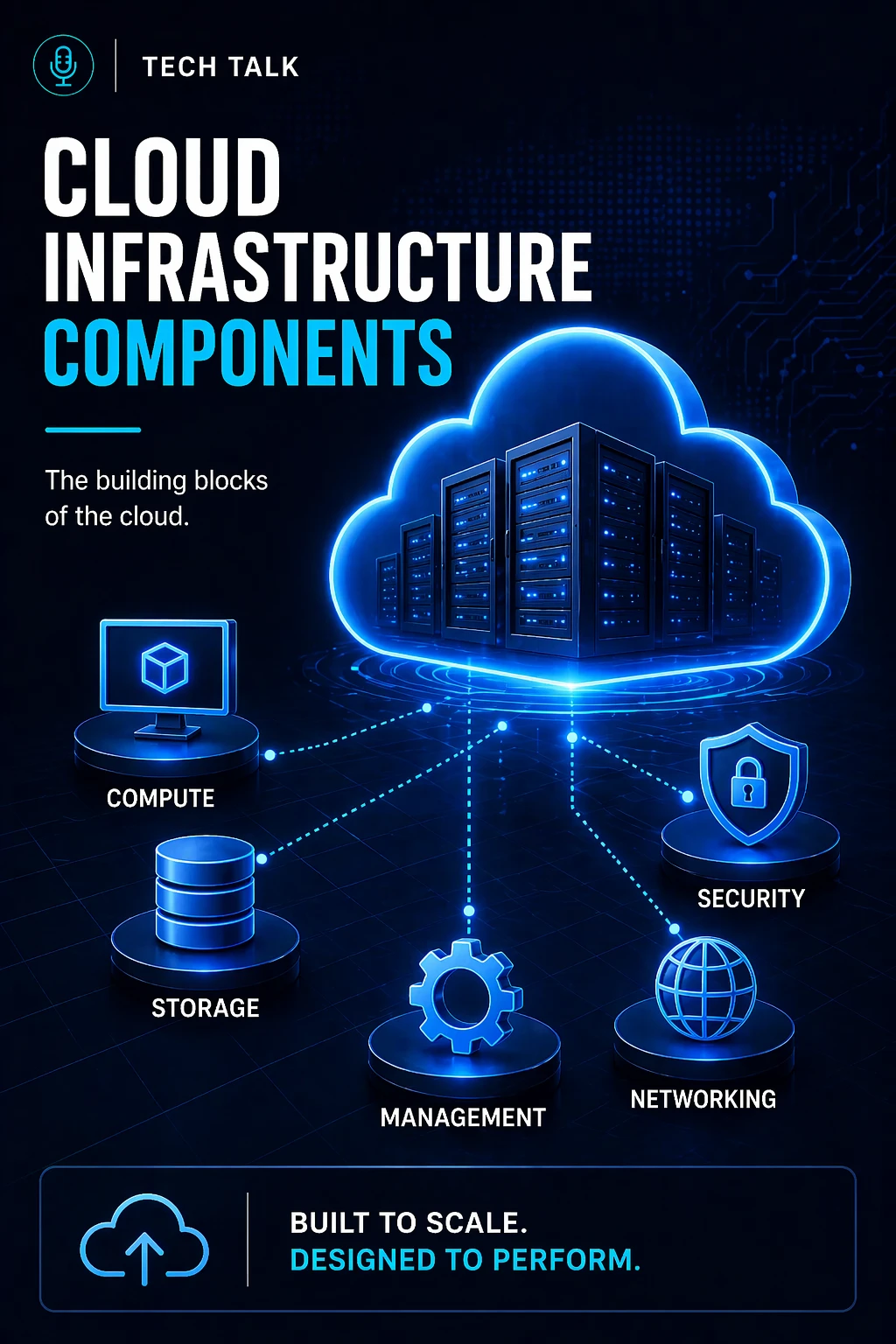
It is made up of multiple components that work together to deliver applications, data, and services.
These components include:
- compute
- storage
- networking
- security
- management and automation
Each component serves a specific purpose.
But the real complexity comes from how they interact — something explored further in cloud infrastructure explained.
Most cloud issues are not caused by a single component — they are caused by how components are connected and configured.
Why Understanding Components Matters
Many businesses use cloud platforms without understanding the underlying components.
This creates risk:
- systems are configured incorrectly
- performance is inconsistent
- costs increase unexpectedly
- recovery becomes difficult
Without a solid understanding of what cloud infrastructure actually is, these problems compound over time.
If you do not understand your infrastructure components, you cannot fully control performance, cost, or reliability.
What a Real Failure Looks Like Across Components
Component failures rarely happen in isolation.
A typical scenario:
- an application slows down
- the issue appears to be compute-related
- investigation reveals a storage bottleneck
- networking delays compound the issue
- monitoring is insufficient to diagnose quickly
At that point:
- downtime increases
- troubleshooting becomes complex
- business impact grows
These types of failures are often rooted in poor cloud infrastructure architecture.
Cloud failures often span multiple components, making them harder to diagnose and resolve.
The Core Components of Cloud Infrastructure
Each component plays a critical role in system performance and reliability.
Compute (Processing Power)
Compute is where applications run.
This includes:
- virtual machines (VMs)
- containers
- serverless functions
Compute determines:
- application speed
- system responsiveness
- workload execution
This layer directly impacts cloud scaling and performance.
What breaks here:
- underprovisioned resources
- inefficient scaling
- poor workload distribution
Insufficient compute capacity leads to slow systems and failed scaling under demand.
Storage (Data Layer)
Storage is where your data lives.
Types include:
- block storage (databases, systems)
- file storage (shared access)
- object storage (cloud-native data)
Storage determines:
- data availability
- performance
- durability
Storage strategy also plays a key role in resilience and recovery, similar to how layered systems work in backup and recovery strategies.
What breaks here:
- slow disk performance
- lack of redundancy
- insufficient retention
Networking (Connectivity Layer)
Networking connects all components.
It includes:
- virtual private clouds (VPCs)
- subnets
- routing tables
- firewalls
- load balancers
Networking determines:
- how systems communicate
- how users access services
- how traffic is distributed
Networking misconfigurations are one of the most common causes of cloud outages.
Poor networking design is one of the biggest differences between cloud and on-premise infrastructure.
What breaks here:
- incorrect routing
- insecure configurations
- bottlenecks in traffic flow
Security (Protection Layer)
Security spans all components.
It includes:
- identity and access management (IAM)
- encryption
- monitoring and logging
Security determines:
- who can access systems
- how data is protected
- how threats are detected
This ties directly into broader cloud infrastructure security.
What breaks here:
- overly broad permissions
- lack of visibility
- unprotected resources
If your cloud components are not properly secured, they can be exploited — even if they function correctly.
Management & Automation (Control Layer)
This layer controls how the environment operates.
It includes:
- monitoring tools
- alerting systems
- automation and orchestration
- infrastructure as code (IaC)
This layer determines:
- consistency
- scalability
- operational efficiency
Strong automation is a key part of modern cloud infrastructure architecture.
What breaks here:
- lack of monitoring
- manual processes
- inconsistent deployments
How Components Work Together
Cloud infrastructure is a system of systems.
Example:
- compute processes an application
- storage provides data
- networking connects services
- security controls access
- management monitors performance
If one component fails:
- the entire system can be affected
Cloud environments fail at the points where components interact — not just where they operate individually.
The Hidden Complexity Between Components
The biggest challenges are not within components — but between them.
Common issues include:
- compute depending on slow storage
- networking delays affecting application performance
- security restrictions blocking legitimate access
- monitoring gaps hiding root causes
These interactions create:
- hidden bottlenecks
- cascading failures
- complex troubleshooting scenarios
This complexity is why understanding the full system — not just parts — is critical, as outlined in cloud infrastructure explained.
What a Poorly Integrated Environment Looks Like
When components are not properly aligned:
- systems become inefficient
- performance becomes unpredictable
- costs increase
- reliability decreases
Typical signs include:
- slow applications despite adequate resources
- inconsistent performance
- unclear failure points
Most performance issues are caused by component misalignment — not resource shortages.
What a Well-Integrated Environment Looks Like
A strong cloud environment ensures:
- compute resources match workload demand
- storage is optimized for performance
- networking is efficient and secure
- security is enforced without blocking operations
- monitoring provides full visibility
Cloud infrastructure works best when all components are designed to operate together — not independently.
How Components Impact Cost
Each component contributes to cost.
Poor configuration leads to:
- overprovisioned compute
- inefficient storage usage
- unnecessary network traffic
Well-optimized systems:
- scale efficiently
- reduce waste
- balance performance and cost
Cloud cost is driven by how components are configured — not just how much they are used.
How to Know If Your Components Are Misaligned
You may have a gap if:
- systems perform inconsistently
- troubleshooting is difficult
- costs increase without clear cause
- dependencies are unclear
If you cannot clearly map how your components interact, your infrastructure is at risk.
How This Connects to Other Cloud Topics
Understanding components is foundational for:
- what is cloud infrastructure
- cloud infrastructure explained
- cloud infrastructure architecture
- cloud scaling and performance
- cloud infrastructure security
What This Means for Your Business
Your infrastructure components determine:
- how your systems perform
- how efficiently you scale
- how reliably you operate
They are not just technical elements.
They are operational building blocks.
Understanding your cloud components is the first step to controlling your infrastructure.
Final Thoughts
Cloud infrastructure is not a single system.
It is a coordinated set of components that must work together.
When they do:
- systems perform
- costs stay controlled
- risks are reduced
When they don’t:
- failures occur
- costs rise
- complexity increases
Need help with this topic?
Make sure your backups actually work when it matters.
Most businesses discover backup failures during an outage. We help you validate recovery, reduce downtime risk, and build a system that works under pressure.
- Backup validation and testing
- Recovery time optimization
- Clear recovery documentation