What a Monthly Patching Rhythm Really Means
A patching rhythm is a structured schedule for:
- reviewing updates
- testing patches
- deploying changes
Instead of reacting to issues, you:
- follow a predictable cycle
- maintain consistent security
If you need foundational context, see patch management smb.
Security improves when patching is consistent — not when it is occasional.
Why a Monthly Rhythm Matters
Without a defined schedule:
- updates are delayed
- systems become inconsistent
- vulnerabilities accumulate
A rhythm ensures:
- predictable maintenance
- reduced risk
- better system stability
The Biggest Risk: Reactive Patching
Many organizations patch only when:
- something breaks
- an alert is triggered
- a vulnerability is exploited
This leads to:
- delayed updates
- increased exposure
Reactive patching allows vulnerabilities to remain exposed longer than necessary.
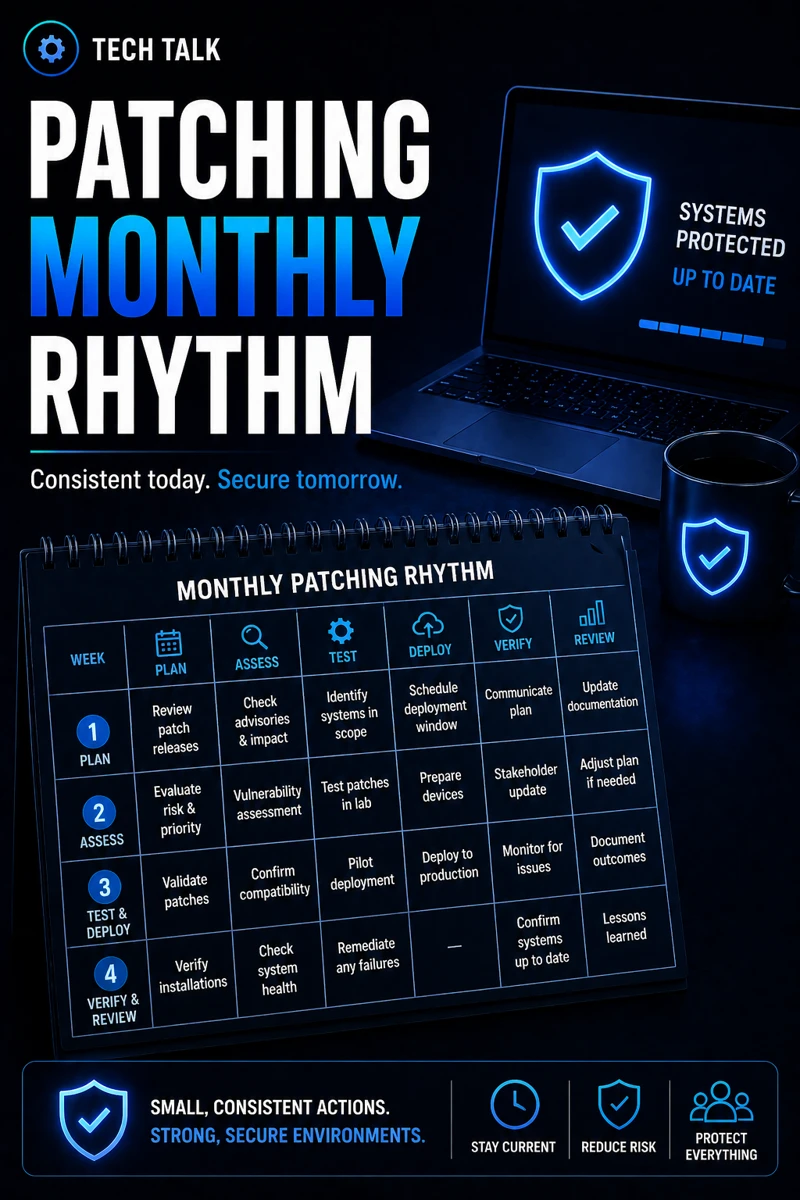
The Standard Monthly Patching Cycle
A strong monthly rhythm includes several phases.
Week 1: Patch Review and Assessment
- review vendor updates
- identify critical patches
- assess risk
Week 2: Testing and Validation
- test patches in controlled environments
- verify compatibility
- identify issues
Week 3: Deployment
- apply patches to production systems
- monitor for issues
- ensure successful updates
Week 4: Verification and Reporting
- confirm patch completion
- review failures
- generate reports
A structured rhythm reduces both security risk and operational disruption.
The Role of Critical Patches
Not all updates can wait.
Critical patches should be:
- deployed immediately
- prioritized outside the normal cycle
These often address:
- active threats
- high-risk vulnerabilities
The Role of Automation
Automation helps:
- deploy patches consistently
- reduce manual effort
- improve coverage
But it must be:
- monitored
- verified
The Role of Testing
Testing prevents:
- system instability
- compatibility issues
Even basic testing reduces risk.
The Hidden Risk: Skipping Validation
Many organizations:
- deploy patches
- assume success
Without validation:
- failures go unnoticed
- systems remain vulnerable
Unverified patches can create a false sense of security.
The Role of Endpoint Security
Endpoints must be:
- updated regularly
- monitored continuously
This aligns with endpoint security basics edr vs antivirus.
The Role of MFA and Access Control
Systems must be:
- protected during updates
- secured against unauthorized access
This aligns with microsoft 365 mfa what to require and for who.
The Role of Incident Response
If a patch causes issues:
- response must be quick
- rollback procedures must exist
This aligns with incident response plan basics.
Patching without a response plan can create new problems.
The Role of Cyber Insurance Requirements
Many insurers require:
- consistent patching
- documented processes
This aligns with cyber insurance controls.
The Complexity of Managing Patches
Patching involves:
- multiple systems
- different vendors
- varying schedules
This creates:
- complexity
- potential gaps
What a Strong Monthly Rhythm Looks Like
A mature patching process includes:
- defined schedule
- prioritized updates
- automated deployment
- monitoring and reporting
It must also align with:
- overall security strategy
- compliance requirements
Consistency and visibility are the keys to effective patch management.
How a Patching Rhythm Impacts Business Operations
A structured rhythm improves:
- system stability
- security posture
- operational efficiency
Without it:
- updates are inconsistent
- risk increases
- downtime becomes more likely
Predictable patching reduces both security risk and operational disruption.
How to Know If Your Patching Process Is Weak
You may have a gap if:
- updates are irregular
- systems are out of date
- patch failures are not tracked
- no schedule exists
If patching is inconsistent, your systems are likely vulnerable.
How to Build a Monthly Patching Rhythm
Start with:
- defining a schedule
- automating updates
- testing patches
- monitoring results
These steps align with broader security practices.
How This Connects to Other Cybersecurity Topics
Patching rhythm connects to:
- patch management smb
- endpoint security basics edr vs antivirus
- incident response plan basics
- cyber insurance controls
- ransomware readiness 60-minute executive checklist
What This Means for Your Business
Your patching rhythm determines:
- how secure your systems are
- how stable your environment is
- how effectively risk is managed
It is not optional.
It is essential.
Consistency in patching is one of the most effective ways to reduce cybersecurity risk.
Final Thoughts
Patching is not just a task.
It is a process.
When done consistently:
- vulnerabilities are reduced
- systems are stable
- operations are smoother
Need help with this topic?
Make sure your backups actually work when it matters.
Most businesses discover backup failures during an outage. We help you validate recovery, reduce downtime risk, and build a system that works under pressure.
- Backup validation and testing
- Recovery time optimization
- Clear recovery documentation