What “What to Require” Really Means
Enabling MFA is only the first step.
What matters more is:
- how MFA is configured
- which methods are allowed
- how consistently it is enforced
Poor configuration creates:
- security gaps
- inconsistent protection
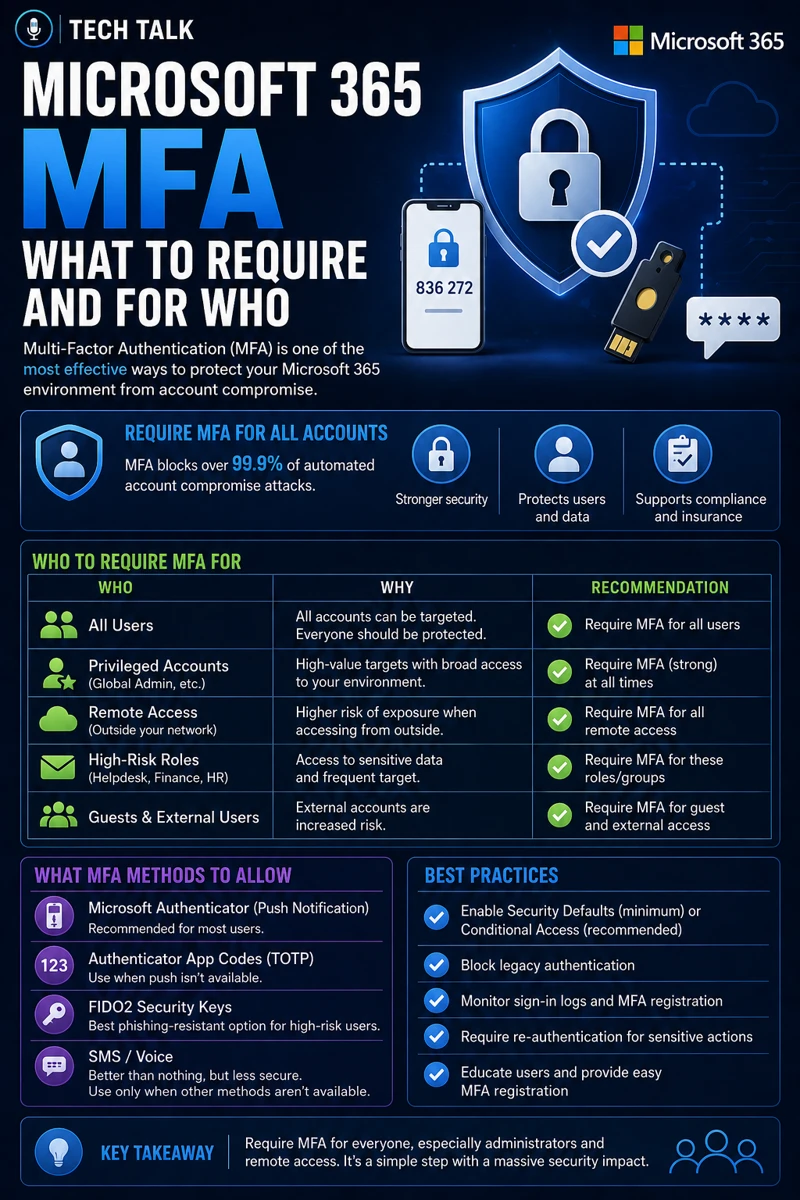
If you need broader context, see microsoft 365 mfa what to require and for who.
MFA is only as strong as its configuration.
Why MFA Configuration Matters
Improper MFA setup leads to:
- bypass opportunities
- user confusion
- increased risk
Even with MFA enabled:
- accounts can still be compromised
This is explained in why mfa fails.
The Biggest Risk: Weak Defaults
Many organizations:
- allow multiple weak methods
- fail to enforce consistent policies
This creates:
- uneven protection
- exploitable weaknesses
Default MFA settings are not designed for maximum security.
What You Should Require in Microsoft 365 MFA
A strong MFA configuration focuses on a few key requirements.
1. Enforce MFA for All Users
MFA must be:
- mandatory
- consistent
Optional MFA creates:
- gaps in protection
This aligns with cyber insurance controls.
2. Require Strong Authentication Methods
Preferred methods include:
- Microsoft Authenticator app
- hardware tokens
Avoid relying solely on:
- SMS
- phone calls
These are more vulnerable.
This aligns with why mfa fails.
3. Require MFA for All Logins (Where Appropriate)
Do not limit MFA to:
- remote access only
Instead:
- enforce MFA consistently
- apply Conditional Access where needed
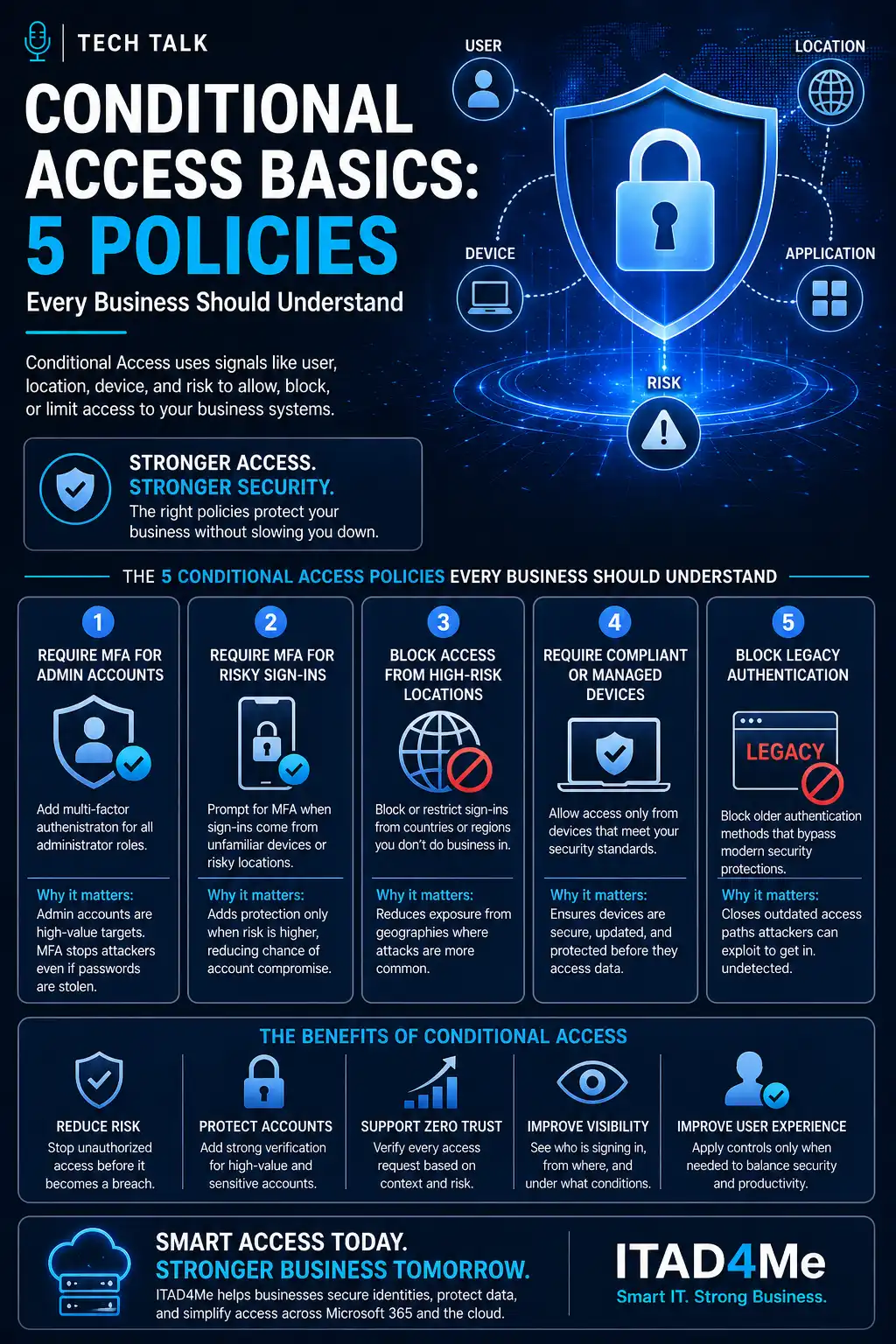
This aligns with conditional access basics 5 policies.
4. Require MFA for Admin Actions
Admin accounts should:
- always require MFA
- use stricter controls
Admin compromise leads to:
- full system access
5. Require Device Registration and Trust
Require:
- known devices
- compliant endpoints
This reduces:
- unauthorized access
This aligns with endpoint security basics edr vs antivirus.
Strong MFA requires both enforcement and method selection.
The Hidden Risk: MFA Fatigue and User Behavior
Even strong MFA can fail if users:
- approve unexpected prompts
- ignore warnings
- act under pressure
These attacks are common in phishing scenarios.
This aligns with phishing defense real world.
MFA can be bypassed when users approve malicious requests.
The Role of Conditional Access
Conditional Access enhances MFA by:
- applying policies
- controlling login conditions
- enforcing security rules
This aligns with conditional access basics 5 policies.
The Role of Monitoring and Alerts
Organizations must monitor:
- login attempts
- failed authentications
- unusual behavior
This enables:
- early detection
- rapid response
The Role of Incident Response
If MFA is bypassed:
- response must be immediate
- accounts must be secured
This aligns with incident response plan basics.
MFA reduces risk — but response determines outcome.
The Role of Patch and Endpoint Security
MFA must be supported by:
- secure endpoints
- updated systems
This aligns with:
The Complexity of MFA Configuration
MFA configuration involves:
- user experience
- security requirements
- system policies
This creates:
- complexity
- potential misconfiguration
What a Strong MFA Setup Looks Like
A strong setup includes:
- enforced MFA for all users
- strong authentication methods
- conditional access policies
- monitoring and alerts
It must also align with:
- overall identity security strategy
Keep MFA policies simple, consistent, and strong.
How MFA Configuration Impacts Business Operations
MFA affects:
- login experience
- security posture
- risk exposure
Poor configuration leads to:
- user frustration
- security gaps
Incorrect MFA configuration can increase both risk and user friction.
How to Know If Your MFA Requirements Are Weak
You may have a gap if:
- MFA is not enforced for all users
- weak methods are allowed
- policies are inconsistent
- login activity is not monitored
If MFA rules are unclear or inconsistent, your identity security is at risk.
How to Improve MFA Requirements
Start with:
- enforcing MFA universally
- requiring stronger methods
- implementing conditional access
- monitoring authentication activity
These steps align with broader cybersecurity best practices.
How This Connects to Other Cybersecurity Topics
MFA configuration connects to:
- microsoft 365 mfa what to require and for who
- why mfa fails
- conditional access basics 5 policies
- phishing defense real world
- incident response plan basics
What This Means for Your Business
Your MFA requirements determine:
- how secure user accounts are
- how easily attackers gain access
- how well your organization is protected
It is not optional.
It is essential.
MFA is effective only when strong methods are required and consistently enforced.
Final Thoughts
MFA is one of the most important security controls available.
But it must be:
- configured correctly
- enforced consistently
- monitored continuously
Need help with this topic?
Make sure your backups actually work when it matters.
Most businesses discover backup failures during an outage. We help you validate recovery, reduce downtime risk, and build a system that works under pressure.
- Backup validation and testing
- Recovery time optimization
- Clear recovery documentation