Why the Recovery Process Matters
Recovery is often misunderstood.
Many organizations assume:
- systems will be restored quickly
- operations will return immediately
- disruption ends when systems come back
In reality:
- recovery takes time
- operations must stabilize
- impact continues beyond restoration
Recovery is not just about restoring systems — it is about restoring the business.
What Is the Business Continuity Recovery Process?
The recovery process is:
👉 the structured sequence of actions required to restore systems, stabilize operations, and return to normal after disruption
It includes:
- system restoration
- operational stabilization
- coordination between teams
- transition back to normal operations
It answers:
👉 How does the business move from disruption to full functionality?
The Relationship Between Continuity and Recovery
Business continuity and recovery are closely connected.
- continuity keeps operations running
- recovery restores systems
Recovery begins:
👉 while continuity is still active
See:
Continuity bridges the gap — recovery closes it.
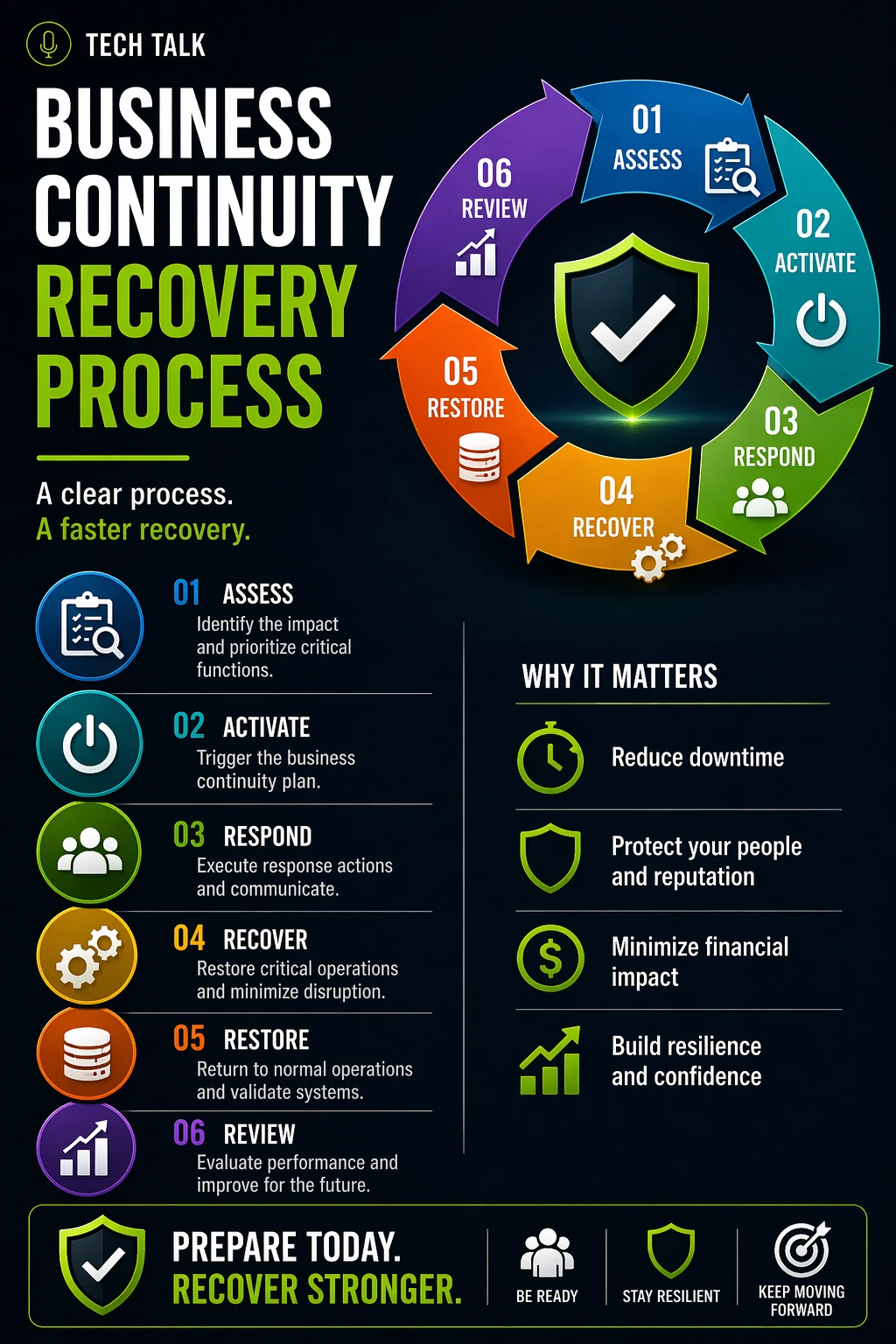
The Phases of the Recovery Process
Recovery is not a single step.
It is a multi-phase process.
1. Incident Stabilization
- contain the disruption
- stop further damage
- secure systems and processes
This phase may involve:
- incident response actions
- isolating affected systems
2. Initial Recovery
- restore critical systems
- prioritize essential functions
- begin limited system availability
Focus:
👉 restore what matters most first
3. Operational Stabilization
- ensure systems function reliably
- support ongoing operations
- resolve immediate issues
This phase is critical because:
- restored systems may not be fully stable
- performance may be limited
Restoring systems is not enough — they must operate reliably under load.
4. Full System Restoration
- restore all systems and services
- complete data recovery
- return full functionality
At this stage:
- core operations are fully supported
5. Return to Normal Operations
- transition away from continuity processes
- resume standard workflows
- clear operational backlogs
This phase includes:
- rebalancing workloads
- restoring efficiency
6. Post-Incident Review
- analyze what happened
- identify gaps and weaknesses
- improve future response
This ensures:
- continuous improvement
- stronger resilience
What Happens When Recovery Is Unstructured
Without a defined recovery process:
- priorities are unclear
- systems are restored out of order
- operations remain unstable
Common outcomes include:
- extended downtime
- repeated failures
- inefficient recovery
Recovery without structure leads to longer disruption and greater impact.
Why Stabilization Is Often Overlooked
Many plans focus on:
- restoring systems
They overlook:
- stabilizing operations
This creates issues such as:
- system instability
- performance problems
- operational disruption
Stabilization is what turns recovery into usable operations.
How to Align Recovery With Business Priorities
Effective recovery requires:
- prioritization based on business impact
- coordination across teams
- alignment with continuity strategies
Key factors include:
- recovery time objectives (RTO)
- recovery point objectives (RPO)
- operational priorities
See
downtime cost
Common Recovery Process Failures
Common issues include:
- restoring non-critical systems first
- lack of coordination between teams
- unclear roles and responsibilities
- insufficient testing
- failure to stabilize operations
These lead to:
- delays
- inefficiency
- increased impact
How to Build an Effective Recovery Process
To improve recovery:
- define clear recovery phases
- prioritize critical systems
- align recovery with business needs
- test recovery regularly
- include stabilization steps
- conduct post-incident reviews
See
business continuity testing
How to Know If Your Recovery Process Has Gaps
Warning signs include:
- unclear recovery priorities
- extended downtime
- repeated issues after restoration
- lack of coordination
If recovery is slow, inconsistent, or unstable, your process is not fully defined.
What This Means for Your Business
The recovery process determines:
- how quickly systems return
- how stable operations are
- how long disruption lasts
- how effectively your business recovers
Recovery is not complete when systems are restored — it is complete when operations are stable.
Final Thoughts
Recovery is not a moment.
It is a process.
Without structure:
- recovery is slow
- impact increases
With structure:
- recovery is controlled
- impact is reduced
Need help with this topic?
Make sure your backups actually work when it matters.
Most businesses discover backup failures during an outage. We help you validate recovery, reduce downtime risk, and build a system that works under pressure.
- Backup validation and testing
- Recovery time optimization
- Clear recovery documentation