What Onboarding and Offboarding Really Mean
Onboarding and offboarding are the processes used to:
- grant access to new users
- remove access for departing users
They control:
- who can access systems
- what permissions they have
- when access begins and ends
Without structured processes:
- access becomes inconsistent
- security risks increase
Uncontrolled user access is one of the most common causes of security incidents.
Why This Process Is Critical
User access is at the center of:
- data protection
- system security
- operational control
Improper handling leads to:
- unauthorized access
- data exposure
- compliance failures
This is especially dangerous in scenarios like business email compromise.
The Biggest Risk: Forgotten Access
Many organizations:
- fail to remove access when employees leave
- leave accounts active
- overlook shared systems
This creates:
- hidden vulnerabilities
- long-term exposure
Former employees with active access represent a serious security threat.
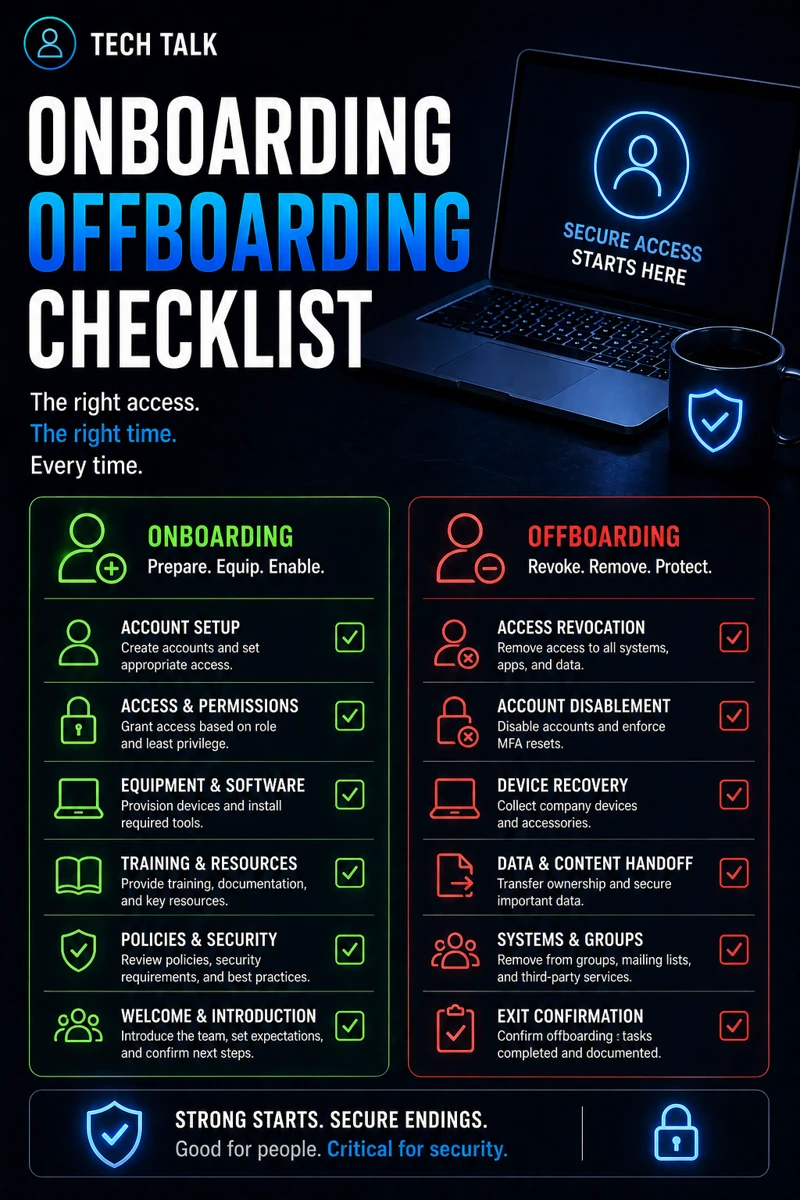
Onboarding Checklist: Secure Setup
A proper onboarding process includes:
1. Account Creation
- create user accounts
- assign unique credentials
2. Role-Based Access
- grant access based on job role
- avoid over-permissioning
3. MFA Enrollment
- require multi-factor authentication
- verify setup
This aligns with microsoft 365 mfa what to require and for who.
4. Device Setup
- configure endpoints securely
- install security tools
This aligns with endpoint security basics edr vs antivirus.
5. Security Training
- educate users on phishing
- explain acceptable use
This aligns with phishing defense real world.
Secure onboarding reduces risk from the very first login.
Offboarding Checklist: Secure Removal
Offboarding is even more critical.
1. Immediate Access Revocation
- disable accounts
- remove system access
2. Device Recovery
- collect company devices
- secure endpoints
3. Data Protection
- transfer ownership of files
- secure sensitive data
4. Credential Reset
- change shared passwords
- revoke tokens and sessions
5. Monitoring for Residual Access
- verify access removal
- monitor for unusual activity
Access should be removed immediately — not days later.
The Hidden Risk: Delayed Offboarding
Delays create:
- unauthorized access windows
- potential data exfiltration
This is particularly dangerous during:
- employee departures
- role changes
The Role of MFA in Access Control
MFA helps:
- secure user accounts
- prevent unauthorized access
But it must be:
- enforced consistently
- properly configured
This aligns with why mfa fails.
The Role of Endpoint Security
Endpoints must be:
- secured during onboarding
- monitored during use
- controlled during offboarding
This aligns with edr vs antivirus.
The Role of Patch Management
Devices must be:
- updated regularly
- protected from vulnerabilities
This aligns with patch management smb.
The Role of Incident Response
Improper access control can lead to incidents.
Response must include:
- rapid containment
- account lockdown
This aligns with incident response plan basics.
Access control failures often lead directly to security incidents.
The Complexity of User Lifecycle Management
Managing user access involves:
- multiple systems
- changing roles
- varying permissions
This creates:
- complexity
- risk of errors
What a Strong Access Management Process Looks Like
A strong process includes:
- documented onboarding procedures
- immediate offboarding actions
- role-based access control
- regular access reviews
It must also align with:
- security policies
- compliance requirements
User access should be reviewed regularly — not just during onboarding or offboarding.
How This Impacts Business Operations
Access management affects:
- security posture
- operational efficiency
- compliance
Poor processes lead to:
- unauthorized access
- inefficiency
- increased risk
Access control failures can result in data loss and operational disruption.
How to Know If Your Process Is Weak
You may have a gap if:
- accounts remain active after departure
- access is inconsistent
- permissions are not documented
- no review process exists
If you cannot quickly confirm who has access to your systems, your process needs improvement.
How to Improve Onboarding and Offboarding
Start with:
- creating standardized checklists
- enforcing role-based access
- automating account management
- performing regular audits
These steps align with broader cybersecurity best practices.
How This Connects to Other Cybersecurity Topics
Onboarding and offboarding connect to:
- business email compromise
- phishing defense real world
- microsoft 365 mfa what to require and for who
- incident response plan basics
- cyber insurance controls
What This Means for Your Business
Your access management determines:
- who can access systems
- how secure your data is
- how quickly risks are controlled
It is not optional.
It is essential.
Managing user access is one of the most effective ways to reduce cybersecurity risk.
Final Thoughts
Onboarding and offboarding are not just HR processes.
They are security controls.
When managed properly:
- access is controlled
- risk is reduced
- operations are smoother
Need help with this topic?
Make sure your backups actually work when it matters.
Most businesses discover backup failures during an outage. We help you validate recovery, reduce downtime risk, and build a system that works under pressure.
- Backup validation and testing
- Recovery time optimization
- Clear recovery documentation